Table of Contents
- Production Kubernetes Cluster
- Installing kube-vip
- Start the cluster
- Install Network CNI: Cilium
- Implement a LoadBalancer
- Install MetalLB (LoadBalancer)
- Helm charts
- Metric-server
- Dashboard
- Adding a service account
- Installation of k9s
- Maintenance operations
- RBAC (Role based access control)
- User management
- Service accounts
Production Kubernetes Cluster
https://kubernetes.io/docs/setup/production-environment/tools/kubeadm/install-kubeadm/
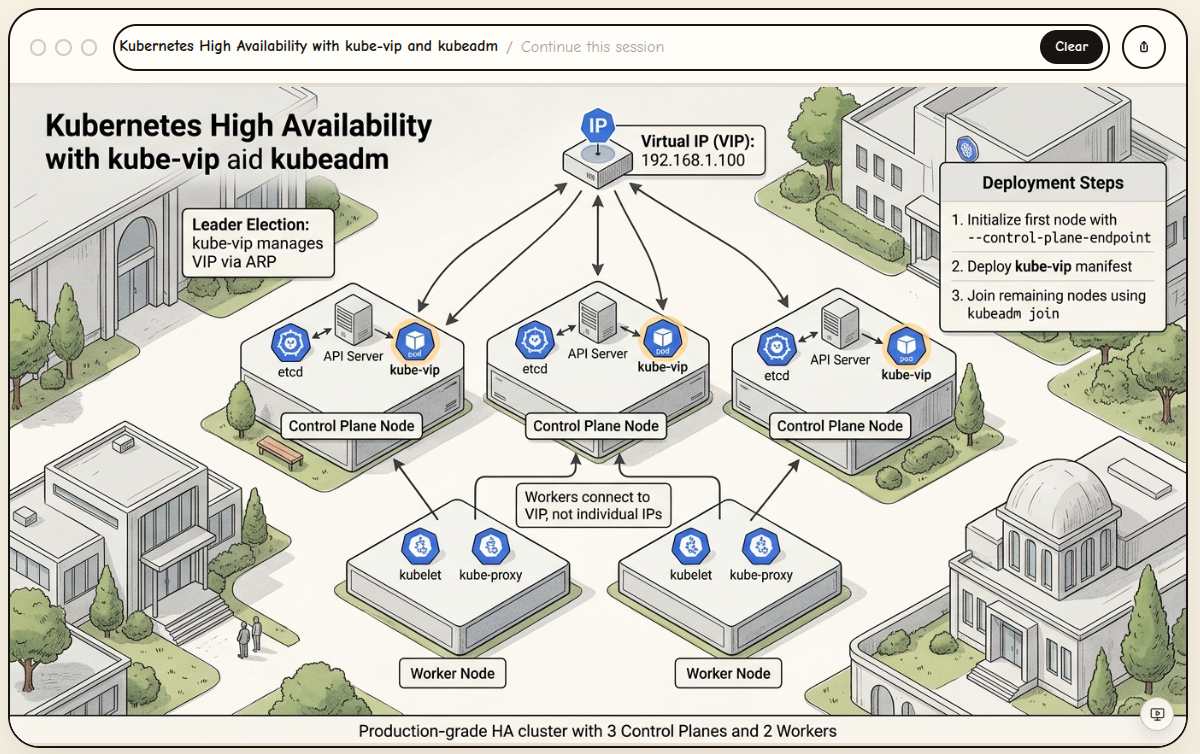
https://flipbook.page/n/741dd1eaf85d488db8bcf66093958965
Before you begin
- A compatible Linux host. The Kubernetes project provides generic instructions for Linux distributions based on Debian and Red Hat, and those distributions without a package manager.
- 2 GB or more of RAM per machine (any less will leave little room for your apps).
- 2 CPUs or more for control plane machines.
- Full network connectivity between all machines in the cluster (public or private network is fine).
- Unique hostname, MAC address, and product_uuid for every node. See here for more details.
- Certain ports are open on your machines. See here for more details.
Verify connection to all nodes
# ping all nodes
ping -c1 k8s-cfreire-cp1
ping -c1 k8s-cfreire-cp2
ping -c1 k8s-cfreire-cp3
ping -c1 k8s-cfreire-w01
ping -c1 k8s-cfreire-w02

# ssh all nodes
ssh k8s-cfreire-cp1 (...)
Verify kubernetes components are installed
# ssh cp1
$ ssh k8s-<name>-cp1
$ kubeadm version

kubeadm version: &version.Info{Major:"1", Minor:"36", EmulationMajor:"", EmulationMinor:"", MinCompatibilityMajor:"", MinCompatibilityMinor:"", GitVersion:"v1.36.1", GitCommit:"756939600b9a7180fc2df6550a4585b638875e67", GitTreeState:"clean", BuildDate:"2026-05-12T09:53:52Z", GoVersion:"go1.26.2", Compiler:"gc", Platform:"linux/amd64"}


$ kubectl version

Client Version: v1.36.1
Kustomize Version: v5.8.1
The connection to the server localhost:8080 was refused - did you specify the right host or port?

$ kubelet --version
Kubernetes v1.36.1

$ systemctl is-enabled kubelet
enabled

$ systemctl is-active kubelet
activating
Determine control-plane (CP1) IP Address
$ ip route | head -1 | awk '{print $9}'
172.31.15.49
Installing kube-vip
Pull the kube-vip manifest (on CP1 only)
# Start a root session
sudo su -
# Set your variables
export VIP_ADDR="172.31.15.200"  # <---- VIP IP Address
export VIP_CIDR="20"
export INTERFACE=$(ip route | head -1 | awk '{print $5}')
export KVVERSION=$(curl -sL https://api.github.com/repos/kube-vip/kube-vip/releases | jq -r ".[0].name")

# Create the static pods directory
mkdir -p /etc/kubernetes/manifests

# Create alias to improve readability
alias kube-vip="ctr image pull ghcr.io/kube-vip/kube-vip:$KVVERSION; ctr run --rm --net-host ghcr.io/kube-vip/kube-vip:$KVVERSION vip /kube-vip"

# Create manifest
kube-vip manifest pod \
	--interface ${INTERFACE} \
    --address ${VIP_ADDR} \
    --vipSubnet ${VIP_CIDR} \
    --controlplane \
    --services \
    --arp \
    --leaderElection | tee /etc/kubernetes/manifests/kube-vip.yaml

# It will generate /etc/kubernetes/manifests/kube-vip.yaml
cat /etc/kubernetes/manifests/kube-vip.yaml
Start the cluster
# List need images
$ sudo kubeadm config images list

# Start downloading k8s images
$ sudo kubeadm config images pull

$ sudo kubeadm init \
  --pod-network-cidr "10.244.0.0/16" \
  --upload-certs \
  --control-plane-endpoint "172.31.15.200:6443"    # VIP
Add configuration to workstation
mkdir -p $HOME/.kube
scp k8s-cfreire-cp1:~/.kube/config ~/.kube/config
kubectl get nodes
Add more control-planes
# Add on CP2 and CP3
sudo kubeadm join 172.31.15.200:6443 --token 1uk9eb.6xp39qzamv2tav69 \
        --discovery-token-ca-cert-hash sha256:d693470afad18b89e3bc037441438e76b72b546662a7155151ad9d13d3e8c5b6 \
        --control-plane --certificate-key 1da9299e9107e03bc7aab70c5172c39715519f1cf43e70cf1585a7529747739d
Add all worker nodes to cluster
# Add on workers W01 and W02
$ sudo kubeadm join 172.31.44.168:6443 --token mszy6q.esfqrbobupuw6b9p \
        --discovery-token-ca-cert-hash sha256:794b0c6e84360767bdc265013729d737f2c09ea095beb4297a3ef9c08de0c8b3
Verify cluster creation
$ kubectl get nodes
NAME              STATUS      ROLES           AGE   VERSION
k8s-cfreire-cp1   NotReady    control-plane   19m   v1.36.1
k8s-cfreire-wk1   NotReady    <none>          16m   v1.36.1
k8s-cfreire-wk2   NotReady    <none>          16m   v1.36.1
All nodes have status: NotReady
Install Network CNI: Cilium
# cp1
CILIUM_CLI_VERSION=$(curl -s https://raw.githubusercontent.com/cilium/cilium-cli/main/stable.txt)

curl -L --fail --remote-name-all \
  https://github.com/cilium/cilium-cli/releases/download/${CILIUM_CLI_VERSION}/cilium-linux-amd64.tar.gz{,.sha256sum}

# verify checkcum
sha256sum --check cilium-linux-amd64.tar.gz.sha256sum

# install
sudo tar xzvfC cilium-linux-amd64.tar.gz /usr/local/bin
rm cilium-linux-amd64.tar.gz{,.sha256sum}

# Verify installation
$ cilium version
cilium-cli: v0.19.2 compiled with go1.25.5 on linux/amd64
cilium image (default): v1.19.1
cilium image (stable): v1.19.4
Deploy Cilium with kube-proxy replacement
cilium install \
  --set kubeProxyReplacement=true \
  --set k8sServicePort=6443 \
  --set hubble.enabled=false \
  --set hubble.relay.enabled=false \
  --set hubble.ui.enabled=false \
  --set k8sServiceHost=$(ip route | head -1 | awk '{print $9}')

cilium status
# wait until all running
Verify ready status
$ kubectl get nodes
NAME              STATUS   ROLES           AGE   VERSION
k8s-cfreire-cp1   Ready    control-plane   19m   v1.36.1
k8s-cfreire-wk1   Ready    <none>          16m   v1.36.1
k8s-cfreire-wk2   Ready    <none>          16m   v1.36.1
Test cilium connectivity (optional)
$ cilium connectivity testCreate a deployment to test cluster
# From workstation
$ kubectl create deploy demo --image nginxdemos/hello:plain-text --replicas=3

$ kubectl get all
NAME                        READY   STATUS    RESTARTS   AGE
pod/demo-5cfbfc6686-hg4k8   1/1     Running   0          12s
pod/demo-5cfbfc6686-szmbl   1/1     Running   0          12s
pod/demo-5cfbfc6686-wvdfk   1/1     Running   0          12s

NAME                 TYPE        CLUSTER-IP   EXTERNAL-IP   PORT(S)   AGE
service/kubernetes   ClusterIP   10.96.0.1    <none>        443/TCP   31m

NAME                   READY   UP-TO-DATE   AVAILABLE   AGE
deployment.apps/demo   3/3     3            3           12s

NAME                              DESIRED   CURRENT   READY   AGE
replicaset.apps/demo-5cfbfc6686   3         3         3       12s
Expose port type NodePort
$ kubectl expose deploy demo --port=80 --type=NodePort
$ kubectl get svc demo
NAME         TYPE        CLUSTER-IP       EXTERNAL-IP   PORT(S)        AGE
demo         NodePort    10.104.153.143   <none>        80:31875/TCP   7s
Test remote access
curl k8s-cfreire-wk1:31875
curl k8s-cfreire-wk2:31875
Shutdown deployment
kubectl delete deploy/demo svc/demoImplement a LoadBalancer
Start with a nodePort deployment
nginx-alpine-deployment.yaml
apiVersion: apps/v1
kind: Deployment
metadata:
  name: nginx
spec:
  replicas: 1
  selector:
    matchLabels:
      app: nginx
  template:
    metadata:
      labels:
        app: nginx
    spec:
      containers:
      - name: nginx
        image: nginx:alpine
        ports:
        - containerPort: 80
        resources:
          requests:
            cpu: "100m"
            memory: "256Mi"
          limits:
            cpu: "200m"
            memory: "512Mi"
      nodeName: k8s-cfreire-worker2  # <-- Nominated node
---
apiVersion: v1
kind: Service
metadata:
  name: nginx-service
spec:
  type: NodePort
  selector:
    app: nginx
  ports:
    - port: 80          # Service port (inside cluster)
      targetPort: 80    # Container port
      nodePort: 30080   # Optional: fixed external port (30000-32767)
# test remote access
curl k8s-cfreire-worker2:30080change replicas to 2 and test all worker nodes
kubectl scale deploy nginx --replicas=2
kubectl rollout status deploy nginx
Change into a LoadBalancer
nginx-loadbalancer.yml
apiVersion: apps/v1
kind: Deployment
metadata:
  name: nginx
  labels:
    app: nginx
spec:
  replicas: 3
  selector:
    matchLabels:
      app: nginx
  template:
    metadata:
      labels:
        app: nginx
    spec:
      containers:
      - name: nginx
        image: nginx:alpine
        ports:
        - containerPort: 80
---
apiVersion: v1
kind: Service
metadata:
  name: nginx-service
spec:
  type: LoadBalancer
  selector:
    app: nginx
  ports:
    - protocol: TCP
      port: 80
      targetPort: 80
Install MetalLB (LoadBalancer)
NOTE: Only works on bare-metal cluster. See: https://metallb.io/installation/clouds/
$ kubectl apply -f https://raw.githubusercontent.com/metallb/metallb/v0.14.5/config/manifests/metallb-native.yaml# Save as metallb-config.yaml
apiVersion: metallb.io/v1beta1
kind: IPAddressPool
metadata:
name: default-pool
namespace: metallb-system
spec:
addresses:
- 172.31.15.10-172.31.15.20
# Save as metallb-l2.yaml
apiVersion: metallb.io/v1beta1
kind: L2Advertisement
metadata:
  name: l2
  namespace: metallb-system
spec:
  ipAddressPools:
  - default-pool
kubectl apply -f metallb-config.yamlHelm charts
curl -fsSL -o get_helm.sh https://raw.githubusercontent.com/helm/helm/main/scripts/get-helm-3
chmod 700 get_helm.sh
./get_helm.sh
Metric-server
kubectl apply -f https://github.com/kubernetes-sigs/metrics-server/releases/download/v0.9.0/components.yamlFix certificate
$ kubectl -n kube-system edit deployment metrics-server

spec:
  template:
    spec:
      containers:
      - name: metrics-server
        args:
        - --cert-dir=/tmp
        - --secure-port=4443
        - --kubelet-preferred-address-types=InternalIP
        - --kubelet-use-node-status-port   # optional, reduces load
        - --kubelet-insecure-tls          # <--- THIS LINE
NOTE: If if fails to edit. Create a dry-run and deploy declarative
Metric-server FIX
kubectl apply -f https://github.com/kubernetes-sigs/metrics-server/releases/download/v0.9.0/components.yaml --dry-run=client -o yaml > metric-server.ym# 1. Wait for rollout
kubectl -n kube-system rollout status deployment metrics-server
# 2. Check APIService is AVAILABLE
kubectl get apiservices v1beta1.metrics.k8s.io -o yaml | grep available
# should show: available: true
# 3. Test metrics
kubectl top nodes
kubectl top pods --all-namespaces
Dashboard
# Add the official chart repo
helm repo add kubernetes-dashboard https://kubernetes.github.io/dashboard/
helm repo update

# Install (or upgrade) the dashboard into namespace `kubernetes-dashboard`
helm upgrade --install kubernetes-dashboard kubernetes-dashboard/kubernetes-dashboard \
  --namespace kubernetes-dashboard \
  --create-namespace
kubectl get pods -n kubernetes-dashboard
kubectl -n kubernetes-dashboard get svcRestart dns and create a port forward
kubectl rollout restart deployment coredns -n kube-system
kubectl -n kubernetes-dashboard port-forward svc/kubernetes-dashboard-kong-proxy 8080:443
NOTE: Create a tunnel for port 8080
Goto https://localhost:8443
Adding a service account
dashboard-adminuser.yaml
apiVersion: v1
kind: ServiceAccount
metadata:
  name: admin-user
  namespace: kubernetes-dashboard
kubectl apply -f dashboard-adminuser.yaml
Create the ClusterRoleBinding
dashboard-clusterrolebinding.yaml
apiVersion: rbac.authorization.k8s.io/v1
kind: ClusterRoleBinding
metadata:
  name: admin-user
roleRef:
  apiGroup: rbac.authorization.k8s.io
  kind: ClusterRole
  name: cluster-admin
subjects:
  - kind: ServiceAccount
    name: admin-user
    namespace: kubernetes-dashboard
kubectl apply -f dashboard-clusterrolebinding.yaml
Create a token
kubectl -n kubernetes-dashboard create token admin-user
eyJhbGciOiJSUzI1NiIsImtpZCI6IkRRdVJ5dFd1NVFMV2ZUMk9Rd2tKYmFWREowQmxjUE5yQks1V1lELTRkQVUifQ.eyJhdWQiOlsiaHR0cHM6Ly9rdWJlcm5ldGVzLmRlZmF1bHQuc3ZjLmNsdXN0ZXIubG9jYWwiXSwiZXhwIjoxNzYyODkyNDM2LCJpYXQiOjE3NjI4ODg4MzYsImlzcyI6Imh0dHBzOi8va3ViZXJuZXRlcy5kZWZhdWx0LnN2Yy5jbHVzdGVyLmxvY2FsIiwianRpIjoiZTNhMjZkMTUtYTg3Ny00NjhkLTkwYWItYTk2NGU5M2RlNmIzIiwia3ViZXJuZXRlcy5pbyI6eyJuYW1lc3BhY2UiOiJrdWJlcm5ldGVzLWRhc2hib2FyZCIsInNlcnZpY2VhY2NvdW50Ijp7Im5hbWUiOiJhZG1pbi11c2VyIiwidWlkIjoiYTI5MTUxYmEtNGM2Yy00NjJkLTg4YzktNTcyNDk4YTkwNTIyIn19LCJuYmYiOjE3NjI4ODg4MzYsInN1YiI6InN5c3RlbTpzZXJ2aWNlYWNjb3VudDprdWJlcm5ldGVzLWRhc2hib2FyZDphZG1pbi11c2VyIn0.OLWvXYf-S7m7lxM4KVUOi5FBga2mOcnZy1c_9uTfvDiZ406xw8kvNQgzuZVCFJGkH1d71ZQTtrjW876sVQl1Arw8SoJASRcrKA282Sl348MFb63NxT4lRuZFwR8_YQ4zTv1pn7M_8JLfsrVhjjXIujL2SWH8_0q1Qh8Tm6ZWxy3FwOcIdaRZ7hKpK5-a3UaOagcz2HFVNaLwUj9nVfYE5Itqo4bu8Cro_Vf2Xk980thbc3-0kG7oEb4HtwsYvGfGzHAZa1oVMJJR_mMy6n7mxhytXIjD3UzQVdt1fS_XqVRJDDPMhrZ96lY6Pr-Syd1yucUVj2SjRVB56D0EH0KHcg
Installation of k9s
version v50.18
wget https://github.com/derailed/k9s/releases/download/v0.50.18/k9s_linux_amd64.rpm
sudo dnf install -y ./k9s_linux_amd64.rpm
Maintenance operations
Start new deployment with 2 replicas
$ kubectl apply -f nginx-alpine-deploy.yml
Get node names
$ kubectl get nodes
NAME                  STATUS   ROLES           AGE    VERSION
k8s-cfreire-ctrl1     Ready    control-plane   125m   v1.34.1
k8s-cfreire-worker1   Ready    <none>          122m   v1.34.1
k8s-cfreire-worker2   Ready    <none>          122m   v1.34.1
Cordon worker2
$ kubectl cordon k8s-cfreire-worker2

$ kubectl get nodes
NAME                  STATUS                     ROLES           AGE    VERSION
k8s-cfreire-ctrl1     Ready                      control-plane   126m   v1.34.1
k8s-cfreire-worker1   Ready                      <none>          124m   v1.34.1
k8s-cfreire-worker2   Ready,SchedulingDisabled   <none>          124m   v1.34.1
Scale deployment to 6 replicas
Remove cordon
$ kubectl uncordon k8s-cfreire-worker2![[Pasted image 20260528200903.png]]Remove all from node3
$ kubectl drain k8s-cfreire-worker2 --ignore-daemonsets --delete-emptydir-dataRBAC (Role based access control)
| Resource | Scope | Purpose |
|---|---|---|
| Role | Namespace | Defines permissions within a namespace |
| ClusterRole | Cluster-wide | Defines permissions across all namespaces |
| RoleBinding | Namespace | Binds a Role to a user/group/SA |
| ClusterRoleBinding | Cluster-wide | Binds a ClusterRole cluster-wide |
Verify if is activated
$ kubectl api-versions | grep rbac

rbac.authorization.k8s.io/v1
List RBAC roles
$ kubectl api-resources | grep rbac

clusterrolebindings                                                     rbac.authorization.k8s.io/v1      false        ClusterRoleBinding
clusterroles                                                            rbac.authorization.k8s.io/v1      false        ClusterRole
rolebindings                                                            rbac.authorization.k8s.io/v1      true         RoleBinding
roles                                                                   rbac.authorization.k8s.io/v1      true         Role
Built-in Cluster Roles
$ kubectl get clusterroles | grep -v system

NAME
admin
cluster-admin
edit
kindnet
kubeadm:get-nodes
view
Who am i
$ kubectl auth whoami
ATTRIBUTE                                VALUE
Username                                 minikube-user
Groups                                   [system:masters system:authenticated]
$ kubectl auth can-i --list
Resources                                       Non-Resource URLs   Resource Names   Verbs
*.*                                             []                  []               [*]
                                                [*]                 []               [*]
selfsubjectreviews.authentication.k8s.io        []                  []               [create]
selfsubjectaccessreviews.authorization.k8s.io   []                  []               [create]
selfsubjectrulesreviews.authorization.k8s.io    []                  []              (...)
User management
Generate a Private Key & Certificate Signing Request
# Generate private key
openssl genrsa -out alice.key 2048

# Create CSR (Certificate Signing Request)
openssl req -new -key alice.key -out alice.csr -subj "/CN=alice/O=ops-team"
Sign the Certificate with Minikube’s CA
openssl x509 -req -in alice.csr \
  -CA ~/.minikube/ca.crt \
  -CAkey ~/.minikube/ca.key \
  -CAcreateserial \
  -out alice.crt \
  -days 365

$ ls alice*
alice.crt  alice.csr  alice.key
Add User to kubeconfig
# Add credentials
kubectl config set-credentials alice \
  --client-certificate=alice.crt \
  --client-key=alice.key

# Create a context for alice
kubectl config set-context alice-context \
  --cluster=minikube \
  --user=alice

# Verify
$ kubectl config get-contexts
CURRENT   NAME            CLUSTER    AUTHINFO   NAMESPACE
          alice-context   minikube   alice
*         minikube        minikube   minikube   default
Bind the Built-in view ClusterRole
# Cluster-wide view access
kubectl create clusterrolebinding alice-view \
  --clusterrole=view \
  --user=alice

kubectl create rolebinding alice-view \
  --clusterrole=view \
  --user=alice \
  --namespace=default
Tests
# Switch to alice's context
kubectl config use-context alice-context

# These should WORK (view access)
kubectl get pods
kubectl get services
kubectl get deployments

# This should FAIL (no write access)
kubectl create deployment nginx --image=nginx
# Error: forbidden

# Switch Back to Admin
kubectl config use-context minikube
Service accounts
# Create a SA for alice
kubectl create serviceaccount alice

# Bind view role
kubectl create clusterrolebinding alice-view \
  --clusterrole=view \
  --serviceaccount=default:alice

# Get the token (acts as a "password")
kubectl create token alice

# Use it in kubeconfig
kubectl config set-credentials alice \
  --token=$(kubectl create token alice)

kubectl config set-context alice-context \
  --cluster=minikube \
  --user=alice

kubectl config use-context alice-conte