Table of Contents
- Kubernetes main components
- Kubernets Components
- Addons
- Web UI
- Container Resource Monitoring
- Cluster-level Logging
- Namespaces
- Autentications
- Kubernets Quiz
- Kubernetes os AWS (EKS)
- Kubernetes on GCP
- Kubernetes on Redhat (openshift)
Kubernetes main components
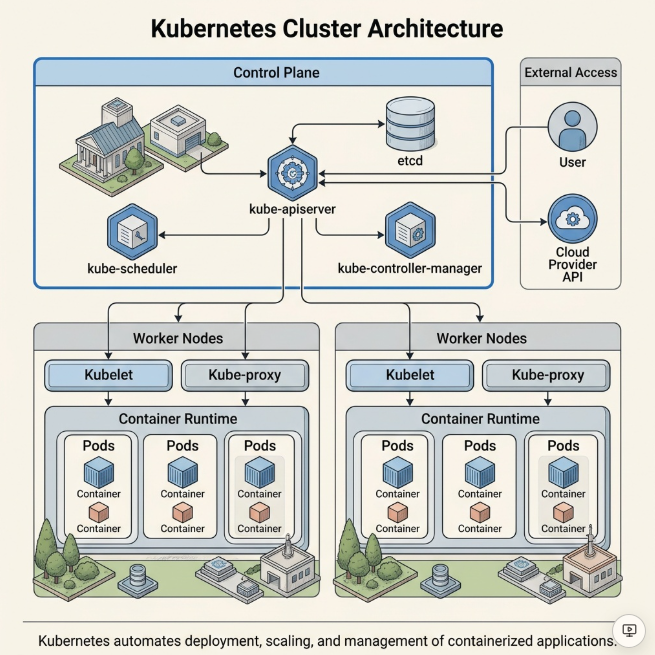
https://flipbook.page/n/5d4eb494d85a4412975df65dae63238e
Control Plane
The control plane’s components make global decisions about the cluster
- kube-apiserver - exposes the Kubernetes API.
- etcd - Consistent and highly-available key value store used as Kubernetes’ backing store for all cluster data
- kube-scheduler - Control plane component that watches for newly created Pods with no assigned node, and selects a node for them to run on
- kube-controller-manager - Deployment controller, Node controller, Job controller, Endpoint controller, Token controller
- cloud-controller-manager - Route controller, Service controller
Node components
Node components run on every node, maintaining running pods and providing the Kubernetes runtime environment
- kubelet - An agent that runs on each node in the cluster. It makes sure that containers are running in a Pod
- kube-proxy - kube-proxy is a network proxy that runs on each node in your cluster, implementing part of the Kubernetes Service
- Container runtime - Software that is responsible for running containers
Node conditions
| Node Condition | Description |
|---|---|
| Ready | True if the node is healthy and ready to accept pods, False if the node is not healthy and is not accepting pods, and Unknown if the node controller has not heard from the node in the last node-monitor-grace-period (default is 40 seconds) |
| DiskPressure | True if pressure exists on the disk size—that is, if the disk capacity is low; otherwise False |
| MemoryPressure | True if pressure exists on the node memory—that is, if the node memory is low; otherwise False |
| PIDPressure | True if pressure exists on the processes—that is, if there are too many processes on the node; otherwise False |
| NetworkUnavailable | True if the network for the node is not correctly configured, otherwise False |
Namespaces
Provides a mechanism for isolating groups of resources within a single cluster.
- default - namespace for objects with no other namespace
- kube-system - namespace for objects created by the Kubernetes system
- kube-public - namespace is created automatically and is readable by all users and is mostly reserved for cluster usage and booting
Authentications
All Kubernetes clusters have two categories of users: service accounts managed by Kubernetes, and normal users.
- Static Token File - reads bearer tokens from a file
- OpenID Connect Tokens - OAuth2 supported by some OAuth2 providers, notably Azure Active Directory, Salesforce, and Google
- Webhook Token Authentication - a hook for verifying bearer tokens
- Authenticating Proxy - Additional authentication logic
Container runtime
- crio
- run-c
- containerd
- podman
Network container interface: CNI
- flannel
- calico
- cilinium
Kubernetes Quiz
- What element runs on each node and ensures containers are running in a pod.
-
kubelet -
etcd -
kube-scheduler -
pod
- Who manages the assigning nodes to pods depending on resource availability.
- Etcd
- Kubectl
- Scheduler
- Flanneld
- What namespace is a special namespace that is used for special purposes like bootstrapping a cluster.
- Kube-public
- Kube-private
- Kube-system
- Default
- What kind of authentication mechanism
ouath2uses to connect to providers
- Webhook Token Authentication
- Keystone Password
- OpenID Connect Tokens
- Authentication Proxy
- What was the programming language used to write K8s
- Perl
- Go
- Python
- Java spring framework
- To create a new deployment in kubernetes, use the command:
-
kubernetes set deployment ... -
kubernetes get deployment ... -
kubectl run ... -
kubectl create deploy ...
- The command to create Kubernetes service is:
-
kubectl expose -
kubectl set service -
kubectl run -
kubectl deploy
- Following k8s resources do not associate with any namespace.
- DaemonSets
- PersistentVolumes
- ReplicaSets
- Nodes
- Services
- What type of service works only if your cluster is setup to work with a cloud provider.
- ClusterIP
- NodePort
- LoadBalancer
- This volume type can be used to share contents within containers in a pod, but will not persist beyond the life of a pod.
- EmptyDir
- Secrets
- ConfigMap
- HostPath
- What resource is responsible for health check of the pods running on individual nodes
-
kubectl - Kube controller manager
- Kube scheduler
-
kubelet
- Cronjobs in kubernetes run in:
- UTC only
- Server NTP settings
- Local time zone
- GMT only
- What type of service is automatically created for you k8s cluster creation and takes care of the internal routing of the cluster.
- NodePort
- ClusterIP
- Headless
- Load Balancer
Solutions
- Q01:
kubelet - Q02: Scheduler
- Q03: Kube-public
- Q04: OpenID Connect Tokens
- Q05: Go
- Q06:
kubectl create deployment ... - Q07:
kubectl expose - Q08: Nodes
- Q09: LoadBalancer
- Q10: EmptyDir
- Q11: kubelet
- Q12: Server NTP settings
- Q13: ClusterIP