Table of Contents
- Starts a local Kubernetes cluster
- Fix maximum open files
- Create a 5 node k8s local cluster
- Implementing a deployment
- Adding toleration
- Clean up cluster
- LoadBalancer using MetalLB
- Configure IP address pool
- Deploy a test service with LoadBalancer
- Verify LoadBalancer IP assignment
- Clean up
Starts a local Kubernetes cluster
Create Highly Available Multi-Control Plane Cluster with a minimum of
three control-plane nodes that will also be marked for work.
minikube options
list of most interesting options
    --addons=[]:
	Enable one or more addons, in a comma-separated format. See `minikube
	addons list` for a list of valid addon names.

    --cni='':
	CNI plug-in to use. Valid options: auto, bridge, calico, cilium,
	flannel, kindnet, or path to a CNI manifest (default: auto)

    -c, --container-runtime='':
	The container runtime to be used. Valid options: docker, cri-o,
	containerd (default: auto)

    --cpus='2':
	Number of CPUs allocated to Kubernetes. Use "max" to use the maximum
	number of CPUs. Use "no-limit" to not specify a limit (Docker/Podman
	only)

    --disk-size='20000mb':
	Disk size allocated to the minikube VM (format: <number>[<unit>],
	where unit = b, k, m or g).

    --dns-domain='cluster.local':
	The cluster dns domain name used in the Kubernetes cluster

    -d, --driver='':
	Driver is one of: virtualbox, kvm2, qemu2, qemu, vmware, none, docker,
	podman, ssh (defaults to auto-detect)

    --ha=false:
	Create Highly Available Multi-Control Plane Cluster with a minimum of
	three control-plane nodes that will also be marked for work.

    --listen-address='':
	IP Address to use to expose ports (docker and podman driver only)

    -m, --memory='':
	Amount of RAM to allocate to Kubernetes (format: <number>[<unit>],
	where unit = b, k, m or g). Use "max" to use the maximum amount of
	memory. Use "no-limit" to not specify a limit (Docker/Podman only)

    --namespace='default':
	The named space to activate after start

    --network='':
	network to run minikube with. Used by docker/podman, qemu, kvm, and
	vfkit drivers. If left empty, minikube will create a new network.

    -n, --nodes=1:
	The total number of nodes to spin up. Defaults to 1.

    --ports=[]:
	List of ports that should be exposed (docker and podman driver only)

    --service-cluster-ip-range='10.96.0.0/12':
	The CIDR to be used for service cluster IPs.

    --static-ip='':
	Set a static IP for the minikube cluster, the IP must be: private,
	IPv4, and the last octet must be between 2 and 254, for example
	192.168.200.200 (Docker and Podman drivers only)

    --subnet='':
	Subnet to be used on kic cluster. If left empty, minikube will choose
	subnet address, beginning from 192.168.49.0. (docker and podman driver
	only)
Delete all instances of minikube if needed to start from scratch
minikube delete --allFix maximum open files
override linux initial limit
sudo su

# add file to system
cat > /etc/sysctl.d/minikube.conf <<EOF
fs.inotify.max_user_watches = 524288
fs.inotify.max_user_instances = 512
EOF

# apply all values
sysctl --system
Create a 5 node k8s local cluster
- 3 control-plane
- 2 workers
minikube start  --cpus='2' --memory='2g' --ha=true     \
  -d='docker' --nodes=5  --profile=ha-cluster
Wait for cluster ready status
$ kubectl get nodes

NAME             STATUS   ROLES           AGE    VERSION
ha-cluster       Ready    control-plane   107s   v1.35.1
ha-cluster-m02   Ready    control-plane   77s    v1.35.1
ha-cluster-m03   Ready    control-plane   50s    v1.35.1
ha-cluster-m04   Ready    <none>          40s    v1.35.1
ha-cluster-m05   Ready    <none>          30s    v1.35.1
Check component status
$ kubectl get componentstatuses

Warning: v1 ComponentStatus is deprecated in v1.19+
NAME                 STATUS    MESSAGE   ERROR
controller-manager   Healthy   ok
scheduler            Healthy   ok
etcd-0               Healthy   ok
Verify cluster health
kubectl exec -n kube-system etcd-ha-cluster -- etcdctl \
  --endpoints=https://127.0.0.1:2379 \
  --cacert=/var/lib/minikube/certs/etcd/ca.crt \
  --cert=/var/lib/minikube/certs/etcd/server.crt \
  --key=/var/lib/minikube/certs/etcd/server.key \
  endpoint health --cluster
Discover leader
$ kubectl get leases -n kube-system -o json | \
  jq '.items[] | {name: .metadata.name, holder: .spec.holderIdentity}'

{
  "name": "apiserver-4av5vyahtjeq5tbmnot7j7obay",
  "holder": "apiserver-4av5vyahtjeq5tbmnot7j7obay_94c43603-8b3a-44da-8210-42563901f092"
}
{
  "name": "apiserver-flxf2b7wrshx7dss5bfrccsvda",
  "holder": "apiserver-flxf2b7wrshx7dss5bfrccsvda_e22ea139-bf20-466e-a4e8-3d58ce93633a"
}
{
  "name": "apiserver-ws6qk3dzcp2flj2h2p2tixpjxe",
  "holder": "apiserver-ws6qk3dzcp2flj2h2p2tixpjxe_404ad3d8-02b0-426d-8a2a-b4581ad146ed"
}
{
  "name": "plndr-cp-lock",
  "holder": "ha-cluster"  # <---- LEADER
}
Pause docker leader node
$ docker pause ha-cluster

$ docker ps
CONTAINER ID   IMAGE                                 COMMAND                  CREATED         STATUS                  PORTS                                                                                                                                  NAMES
bda670155e8a   gcr.io/k8s-minikube/kicbase:v0.0.50 4 minutes ago   Up 4 minutes     ha-cluster-m05
3f1c3e01c5d9   gcr.io/k8s-minikube/kicbase:v0.0.50 4 minutes ago   Up 4 minutes    ha-cluster-m04
f61c1ea673d9   gcr.io/k8s-minikube/kicbase:v0.0.50 4 minutes ago   Up 4 minutes   ha-cluster-m03
5a0d6e0d39a9   gcr.io/k8s-minikube/kicbase:v0.0.50 5 minutes ago   Up 5 minutes    ha-cluster-m02
a75a2bd83d4e   gcr.io/k8s-minikube/kicbase:v0.0.50  5 minutes ago   Up 5 minutes (Paused)  ha-cluster
Verify new leader elected
$ kubectl get leases -n kube-system -o json |   jq '.items[] | {name: .metadata.name, holder: .spec.holderIdentity}'

{
  "name": "apiserver-gt4rgk72koodsxexz2z7rmkbgm",
  "holder": "apiserver-gt4rgk72koodsxexz2z7rmkbgm_2c70ce47-c86e-4272-9e2c-dc650cc2ec8c"
}
{
  "name": "apiserver-zuix2bstlg5hle5e7zbeezsm7u",
  "holder": "apiserver-zuix2bstlg5hle5e7zbeezsm7u_ad9697cc-f037-472a-9480-8656a003c016"
}
{
  "name": "plndr-cp-lock",
  "holder": "minikube-m03"  # <---- NEW LEADER
}
Inspect nodes
$ kubectl get nodes

NAME             STATUS     ROLES           AGE     VERSION
ha-cluster       NotReady   control-plane   4m31s   v1.35.1
ha-cluster-m02   Ready      control-plane   4m1s    v1.35.1
ha-cluster-m03   Ready      control-plane   3m34s   v1.35.1
ha-cluster-m04   Ready      <none>          3m24s   v1.35.1
ha-cluster-m05   Ready      <none>          3m14s   v1.35.1
Resume normal operations
docker unpause ha-cluster
Inspect node status
# Check why it's NotReady
$ kubectl describe node ha-cluster | grep -A 6 Conditions

Type             Status  LastHeartbeatTime                 LastTransitionTime                Reason                       Message
  ----             ------  -----------------                 ------------------                ------                       -------
  MemoryPressure   False   Fri, 15 May 2026 17:30:50 +0100   Fri, 15 May 2026 17:30:50 +0100   KubeletHasSufficientMemory   kubelet has sufficient memory available
  DiskPressure     False   Fri, 15 May 2026 17:30:50 +0100   Fri, 15 May 2026 17:30:50 +0100   KubeletHasNoDiskPressure     kubelet has no disk pressure
  PIDPressure      False   Fri, 15 May 2026 17:30:50 +0100   Fri, 15 May 2026 17:30:50 +0100   KubeletHasSufficientPID      kubelet has sufficient PID available
  Ready            True    Fri, 15 May 2026 17:30:50 +0100   Fri, 15 May 2026 17:30:50 +0100   KubeletReady                 kubelet is posting ready status
Implementing a deployment
$ kubectl create deploy hello --image nginxdemos/hello --replicas=5

$ kubectl get pods -o custom-columns='NAME:.metadata.name,READY:.status.containerStatuses[0].ready,STATUS:.status.phase,NODE:.spec.nodeName'

NAME                     READY   STATUS    NODE
hello-5d87b4dc76-97t6d   true    Running   ha-cluster-m02
hello-5d87b4dc76-jzrwh   true    Running   ha-cluster-m03
hello-5d87b4dc76-lwzbz   true    Running   ha-cluster-m05
hello-5d87b4dc76-q84rw   true    Running   ha-cluster
hello-5d87b4dc76-z9kz8   true    Running   ha-cluster-m04
Shutdown operations on one node
Info
It will take 2 minutes to change STATUS
docker pause ha-cluster-m03

$ kubectl get nodes

NAME             STATUS     ROLES           AGE     VERSION
ha-cluster       Ready      control-plane   7m12s   v1.35.1
ha-cluster-m02   Ready      control-plane   6m42s   v1.35.1
ha-cluster-m03   NotReady   control-plane   6m15s   v1.35.1
ha-cluster-m04   Ready      <none>          6m5s    v1.35.1
ha-cluster-m05   Ready      <none>          5m55s   v1.35.1
Warning
It will take 5 minutes to relocate pods\
Rejoin node
docker unpause ha-cluster-m03

kubectl delete deploy/hello
Adding toleration
kubectl create deploy hello --image nginxdemos/hello --replicas=5 --dry-run=client -o yaml > hello-deploy.yaml
`hello-path.yaml
spec:
  replicas: 5
  selector:
    matchLabels:
      app: hello
  strategy: {}
  template:
    metadata:
      labels:
        app: hello
    spec:
      # add tolerations to reduce timeout
      tolerations:
      - key: "node.kubernetes.io/unreachable"
        operator: "Exists"
        effect: "NoExecute"
        tolerationSeconds: 30
      - key: "node.kubernetes.io/not-ready"
        operator: "Exists"
        effect: "NoExecute"
        tolerationSeconds: 30
       # end toleration block
Apply patch
kubectl patch deploy/hello --patch-file hello-patch.ymlPause running node
docker pause ha-cluster-m05

$ kubectl get nodes

NAME             STATUS     ROLES           AGE   VERSION
ha-cluster       Ready      control-plane   19m   v1.35.1
ha-cluster-m02   Ready      control-plane   18m   v1.35.1
ha-cluster-m03   Ready      control-plane   18m   v1.35.1
ha-cluster-m04   Ready      <none>          18m   v1.35.1
ha-cluster-m05   NotReady   <none>          18m   v1.35.1
$ kubectl get pods
NAME                     READY   STATUS        RESTARTS   AGE
hello-79c867d4db-8wxlv   1/1     Running       0          7m58s
hello-79c867d4db-ddtt9   1/1     Running       0          9m34s
hello-79c867d4db-jnq6b   1/1     Running       0          9m34s
hello-79c867d4db-v5t86   1/1     Running       0          9m34s
hello-79c867d4db-vvp8j   1/1     Terminating   0          9m34s
hello-79c867d4db-zjrlb   1/1     Running       0          9m3
Clean up cluster
# to delete terminated pod
kubectl delete pod <pod-name> --force --grace-period=0

# to shutdown deployment
kubectl delete -f hello-deploy.yaml

# to delete cluster
minikube delete --all
LoadBalancer using MetalLB
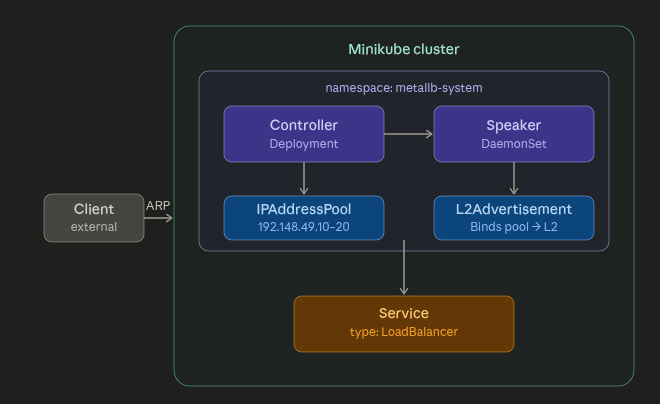
Minikube includes a built-in MetalLB addon. Enable it with:
# Get latest version of metallb
kubectl apply -f https://raw.githubusercontent.com/metallb/metallb/v0.16.1/config/manifests/metallb-frr-k8s.yaml

echo "==> Waiting for MetalLB pods to be ready..."
kubectl wait --namespace metallb-system \
  --for=condition=ready pod \
  --selector=app=metallb \
  --timeout=90s

# Pods should be running
kubectl get pods -n metallb-system
This installs MetalLB in the metallb-system namespace
Configure IP address pool
MetalLB needs a range of IP addresses it can assign to LoadBalancer services.
On Minikube, the default Docker network usually uses the 192.168.49.0/24 range.
We’ll reserve a small subnet for MetalLB.
Create a ConfigMap in the metallb-system namespace:
metallb-config.yml
---
apiVersion: metallb.io/v1beta1
kind: IPAddressPool
metadata:
  name: docker-pool
  namespace: metallb-system
spec:
  addresses:
    - 192.168.49.100-192.168.49.120
---
apiVersion: metallb.io/v1beta1
kind: L2Advertisement
metadata:
  name: my-l2-advert
  namespace: metallb-system
spec:
  ipAddressPools:
    - docker-pool
# CRDs should now exist
kubectl get crds | grep metallb

kubectl get ipaddresspool -n metallb-system

kubectl get l2advertisement -n metallb-system
Note: The IP range must be within the Minikube node’s network.
Check your Minikube IP withminikube ipand adjust accordingly.
Deploy a test service with LoadBalancer
Create a simple deployment and expose it with a LoadBalancer service:
kubectl create deployment nginx --image nginxdemos/hello:plain-text --replicas=3
kubectl expose deployment nginx --port=80 --target-port=80 --type=LoadBalancer --name=nginx-lb

# find bridge name
$ brctl show
bridge name     bridge id               STP enabled     interfaces
br-66c50f3afbd3         8000.564e8b13c450       no              veth30a57a9
                                                        veth432cd0f
                                                        vethb014087
                                                        vethdc690d8
                                                        vethee47bd1
docker0         8000.1ec090682ff5       no
docker_gwbridge         8000.6a0c54879758       no              veth3aa982f
virbr0          8000.525400fba0d0       yes

# start tcpdump to see arp request/replay
sudo tcpdump -i br-66c50f3afbd3 -n arp host 192.168.49.100
Verify LoadBalancer IP assignment
Wait a few seconds, then check the service:
You should see an EXTERNAL-IP in the range you configured (e.g., 192.168.49.100).
Test the service:
kubectl get svc nginx-lb

curl http://192.168.49.100
# You should get the nginx hello page.
Find leader node
$ kubectl logs -n metallb-system -l component=speaker \
   --all-containers --prefix \
  | grep "serviceAnnounced\|announcing" \
  | tail -5

[pod/speaker-sqdb7/speaker] {"caller":"main.go:481","event":"serviceAnnounced","ips":["192.168.49.100"],"level":"info","msg":"service has IP, announcing","pool":"docker-pool","protocol":"layer2","ts":"2026-06-14T16:33:09Z"}

$ kubectl -n metallb-system get pods -owide

NAME                          READY   STATUS    RESTARTS   AGE     IP             NODE             NOMINATED NODE   READINESS GATES
controller-867646bb46-lrg4h   1/1     Running   0          9m44s   10.244.3.12    ha-cluster-m04   <none>           <none>
speaker-8ggt5                 1/1     Running   0          138m    192.168.49.2   ha-cluster       <none>           <none>
speaker-gc9ds                 1/1     Running   0          138m    192.168.49.5   ha-cluster-m04   <none>           <none>
speaker-nf2pv                 1/1     Running   0          138m    192.168.49.3   ha-cluster-m02   <none>           <none>
speaker-sqdb7                 1/1     Running   0          138m    192.168.49.6   ha-cluster-m05   <none>           <none>
speaker-z2tsq                 1/1     Running   0          138m    192.168.49.4   ha-cluster-m03   <none>           <none>

$ docker pause ha-cluster-m05

$ kubectl get nodes
NAME             STATUS     ROLES           AGE     VERSION
ha-cluster       Ready      control-plane   3h26m   v1.35.1
ha-cluster-m02   Ready      control-plane   3h26m   v1.35.1
ha-cluster-m03   Ready      control-plane   3h25m   v1.35.1
ha-cluster-m04   Ready      <none>          3h25m   v1.35.1
ha-cluster-m05   NotReady   <none>          3h25m   v1.35.1
Clean up
kubectl delete service nginx-lb
kubectl delete deployment nginx