Table of Contents
Table of Contents
Table of Contents
Hue
Hue is an open source SQL Assistant for Databases & Data Warehouses. https://gethue.com/
Requirements:
- Docker containers
- Support for docker o VSCODE
run hue on docker
docker run -d --name hue -p 8888:8888 -v hue_data:/usr/share/hue -v /etc/hosts:/etc/hosts gethue/hue:latestedit inside hue container: /usr/share/hue/desktop/conf/hue.ini
[desktop]
time_zone=Europe/Lisbon

[hadoop]

# Configuration for HDFS NameNode
# ------------------------------------------------------------------------
[[hdfs_clusters]]
  # HA support by using HttpFs

[[[default]]]
# Enter the filesystem uri
fs_defaultfs=hdfs://<local-ip>:9000

# NameNode logical name.
## logical_name=

# Use WebHdfs/HttpFs as the communication mechanism.
# Domain should be the NameNode or HttpFs host.
# Default port is 14000 for HttpFs.
webhdfs_url=http://<local-ip>:9870/webhdfs/v1

[]
Create a ‘redhat’ user on login panel
Hive
It provides SQL-like access for data in HDFS making Hadoop to be used like a warehouse structure
Installation
https://hive.apache.org/development/gettingstarted-latest/
Download HIVE
https://archive.apache.org/dist/hive/hive-4.1.0/ (Java17)
# Extract HIVE and put on /usr/local
tar -xzvf hive-x.y.z.tar.gz


# Add HIVE_HOME to .bashrc
export HIVE_HOME="/usr/local/apache-hive-4.1.0-bin"
export PATH=$PATH:$HIVE_HOME/bin

# Create a tmp directory within the HDFS storage layer. This directory is going to store the intermediary data Hive sends to the HDFS
hdfs dfs -mkdir /tmp

# Add write and execute permissions to tmp group members
hdfs dfs -chmod g+w /tmp

# Check if the permissions were added correctly
hdfs dfs -ls /

# Create the warehouse directory within the /user/hive/ parent directory:
hdfs dfs -mkdir -p /user/hive/warehouse

# Add write and execute permissions to warehouse group members:
hdfs dfs -chmod g+w /user/hive/warehouse

# Check if the permissions were added correctly:
hdfs dfs -ls /user/hive
Init and start HIVE
# Initiate a derby driver
schematool -dbType derby -initSchema

# Running HiveServer2
hiveserver2

# Verify
$jps
(...)
RunJar
(...)
Executing Beeline
beeline -u jdbc:hive2://$HS2_HOST:10000CREATE TABLE pokes (foo INT, bar STRING);
SHOW TABLES;
DESCRIBE pokes;
SELECT * FROM pokes;PORDATA Example
https://www.pordata.pt/Portugal/Popula%c3%a7%c3%a3o+residente++m%c3%a9dia+anual+total+e+por+sexo-6
Remove header from CSV and change ”,” ”.”
Import data from PORDATA
CREATE TABLE IF NOT EXISTS pordata(ano string, total float, m float, f float)
	COMMENT 'PORDATA' ROW FORMAT DELIMITED
    FIELDS TERMINATED BY ';' STORED AS TEXTFILE;

LOAD DATA LOCAL INPATH '/home/redhat/PORDATA.csv'
    OVERWRITE INTO TABLE pordata;
Hbase
This project’s goal is the hosting of very large tables — billions of rows X millions of columns — atop clusters of commodity hardware. Google rename project to Bigtable
Hbase Modes
HBase is based on Hadoop and HDFS, and it provides low latency, random, real-time, read/write access to big data
HBase is a NoSQL database
- Standalone (No Hadoop required - local)
- Standalone HBase over HDFS (local server)
- Distributed (multiple nodes and regions)
Installation
https://hbase.apache.org/downloads
# Start HBASE
$ /usr/local/bin/hbase-2.6.6-hadoop3/start-hbase.sh

export HBASE_HOME="/usr/local/hbase-2.6.6-hadoop3/"
# see java process
$ jps
Hmaster

$ hdfs dfsadmin -safemode leave
Example Hbase Shell
$ hbase shell
Version 2.6.6-hadoop3

> create 'table-cesar', 'f1', 'f2' # create table
> alter 'table-cesar', {NAME => 'f1', VERSIONS => '2' }
> put 'table-cesar', 'row1', 'f1:name', 'Cesar'
> list
> describe 'table-cesar'
> scan 'table-cesar' # put more data
> scan 'table-cesar', {STARTROW => 'row2'}
> count 'table-cesar'
> get 'table-cesar', 'row1'
> get 'table-cesar', 'row1', 'f1:lastname'
> disable 'table-cesar'
> drop 'table-cesar'
> exit
Importing data
example: https://www.pordata.pt/
$ hbase shell
> create 'sensor', 'ano', 'total', 'm', 'f'
> list
>
$ hadoop fs -put PORDATA.csv
$ hadoop fs -ls

$ hbase org.apache.hadoop.hbase.mapreduce.ImportTsv \
-Dimporttsv.separator=";" \
-Dimporttsv.columns=HBASE_ROW_KEY,TOTAL,M,F \
	sensor hdfs://127.0.0.1:/user/redhat/PORDATA.csv
Spark
Apache Spark™ is a multi-language engine for executing data engineering, data science, and machine learning on single-node machines or clusters.
Local installation
mkdir pyspark && cd pyspark
pip install pyspark

$ pyspark
Python 3.14.5 (main, Jun  2 2026, 22:25:17) [Clang 22.1.3 ] on linux
Type "help", "copyright", "credits" or "license" for more information.
WARNING: Using incubator modules: jdk.incubator.vector
Using Spark's default log4j profile: org/apache/spark/log4j2-defaults.properties
26/10/11 18:58:14 WARN Utils: Your hostname, x1, resolves to a loopback address: 127.0.1.1; using 192.168.1.121 instead (on interface enxf4a80dd793ae)
26/10/11 18:58:14 WARN Utils: Set SPARK_LOCAL_IP if you need to bind to another address
Using Spark's default log4j profile: org/apache/spark/log4j2-defaults.properties
Setting default log level to "WARN".
To adjust logging level use sc.setLogLevel(newLevel). For SparkR, use setLogLevel(newLevel).
26/10/11 18:58:15 WARN NativeCodeLoader: Unable to load native-hadoop library for your platform... using builtin-java classes where applicable
Welcome to
      ____              __
     / __/__  ___ _____/ /__
    _\ \/ _ \/ _ `/ __/  '_/
   /__ / .__/\_,_/_/ /_/\_\   version 4.2.0
      /_/

Using Python version 3.14.5 (main, Jun  2 2026 22:25:17)
Spark context Web UI available at http://x1.Home:4040
Spark context available as 'sc' (master = local[*], app id = local-1791741495868).
SparkSession available as 'spark'.
>>>
Pyspark example: Simpsons DataFrame
https://pyspark.apache.org/docs/latest/api/python/
# put some data
data = [
    ('Homer',    'Simpson', 40, 'Husband & Father',  'Mmm... donuts'),
    ('Marge',    'Simpson', 38, 'Wife & Mother',     'Mmmmm...'),
    ('Bart',     'Simpson', 10, 'Student',           'Ay caramba!'),
    ('Lisa',     'Simpson',  8, 'Student',           'If anyone wants me, I will be in my room'),
    ('Maggie',   'Simpson',  1, 'Baby',              '(sucks pacifier)'),
    ('Ned',      'Flanders',60, 'Neighbor',          'Okily Dokily!'),
    ('Charles',  'Burns',  104, 'Billionaire',       'Excellent!'),
]
columns = ["firstname","lastname","age","role","catchphrase"]

df = spark.createDataFrame(data=data, schema=columns)

# show data
df.show()

# simple DataFrame operations
df.select("firstname", "age").show()
df.filter(col("lastname") == "Simpson").show()
df.orderBy(col("age").desc()).show()
df.groupBy("lastname").count().show()
Output
+----------+---------+---+-----------------+--------------------+
|firstname| lastname|age|             role|         catchphrase |
+---------+---------+---+-----------------+---------------------+
|    Homer|  Simpson| 40|Husband & Father|       Mmm... donuts  |
|    Marge|  Simpson| 38|   Wife & Mother|             Mmmmm... |
|     Bart|  Simpson| 10|         Student|          Ay caramba! |
|     Lisa|  Simpson|  8|         Student|If anyone wants m...  |
|   Maggie|  Simpson|  1|             Baby|    (sucks pacifier) |
|      Ned| Flanders| 60|         Neighbor|        Okily Dokily!|
|  Charles|    Burns|104|      Billionaire|           Excellent!|
+---------+---------+---+-----------------+---------------------+
Spark context Web UI
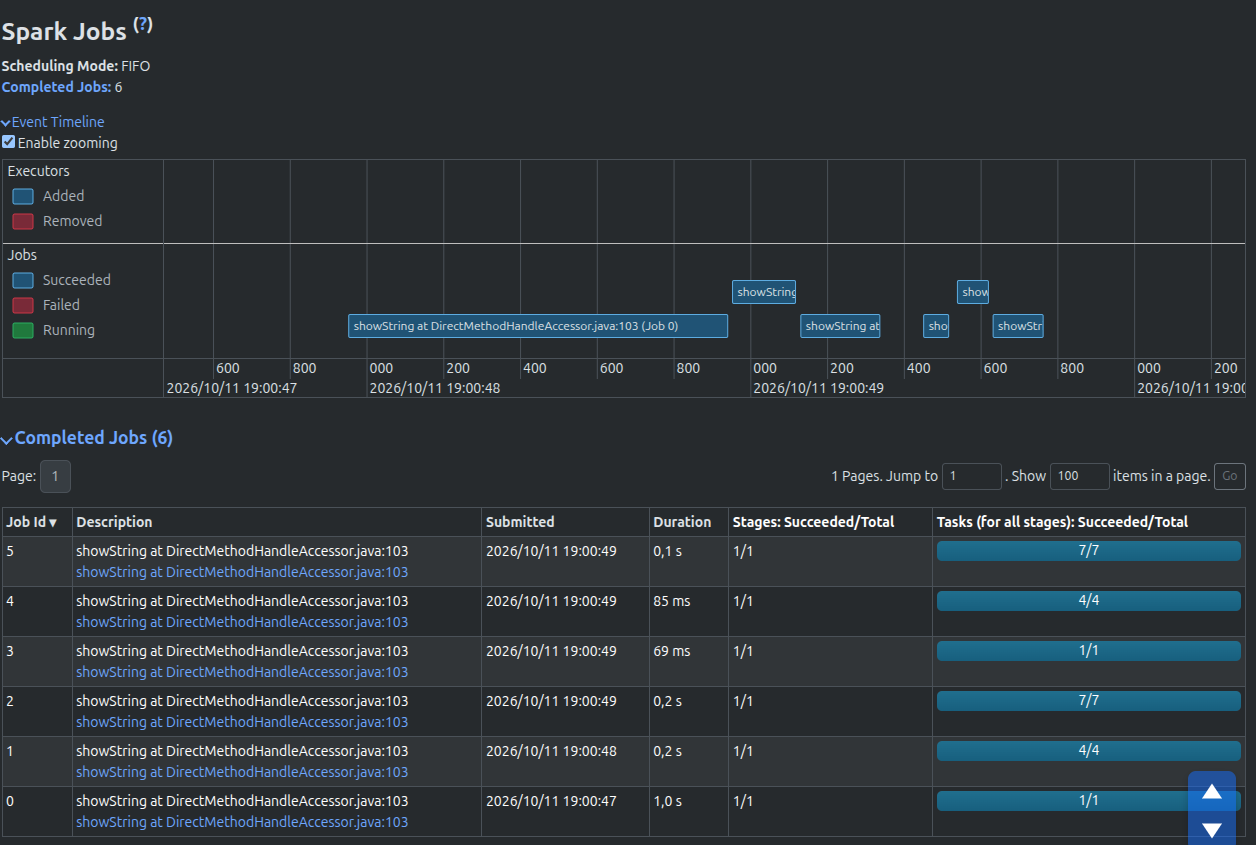
http://<server-ip>:4040
Hadoop server instalation
https://spark.apache.org/downloads.html
Add environments variables
# Download and extract
wget https://dlcdn.apache.org/spark/spark-4.2.0/spark-4.2.0-bin-hadoop3.tgz, -O, /tmp/spark.tgz

tar -zxf /tmp/spark.tgz -C /usr/local/

ln -s /usr/local/spark-4.2.0-bin-hadoop3/ /usr/local/spark
cp /usr/local/spark/conf/spark-env.sh.template /usr/local/spark/conf/spark-env.sh

# Spark Environment
export SPARK_HOME="/usr/local/spark"
export PATH=$PATH:$SPARK_HOME/bin
export PATH=$PATH:$SPARK_HOME/sbin
WebUI
http://localhost:8080/
Try example
/usr/local/spark/sbin/start-all.sh
run-example --master spark://localhost:7077 SparkPi
Docker installation
Create a spark cluster with 3 workers
spark-local-cluster.yml
services:
  spark-master:
    image: apache/spark:4.1.3-scala2.13-java21-python3-r-ubuntu
    command: /opt/spark/bin/spark-class org.apache.spark.deploy.master.Master --host 0.0.0.0 --port 7077 --webui-port 8080
    ports:
      - "8080:8080"
      - "7077:7077"
    networks:
      - spark-net
    deploy:
      replicas: 1

  spark-worker:
    image: apache/spark:4.1.3-scala2.13-java21-python3-r-ubuntu
    command: /opt/spark/bin/spark-class org.apache.spark.deploy.worker.Worker spark://spark-master:7077
    environment:
      - SPARK_WORKER_CORES=2
      - SPARK_WORKER_MEMORY=2g
    networks:
      - spark-net
    deploy:
      replicas: 3
      restart_policy:
        condition: on-failure

networks:
  spark-net:
    driver: overlay
    attachable: true
$ mkdir spark-cluster && cd spark-cluster

$ docker --version
Docker version 29.1.3, build 29.1.3-0ubuntu4.1

$ docker swarm init --advertise-addr  192.168.1.121
Swarm initialized: current node (wiyz4zd5dqko4fq1zlhnkyw20) is now a manager.

To add a worker to this swarm, run the following command:

    docker swarm join --token SWMTKN-1-2v6vv906u6x8a8xct6d0b5ypklsj9n724fo3n321g66tk5rku8-857pe02ptcov55ulhlt291n9b 192.168.1.121:2377

To add a manager to this swarm, run 'docker swarm join-token manager' and follow the instructions.

$ docker node ls
ID                            HOSTNAME   STATUS    AVAILABILITY   MANAGER STATUS   ENGINE VERSION
wiyz4zd5dqko4fq1zlhnkyw20 *   x1         Ready     Active         Leader           29.1.3

$ docker stack deploy -c spark-cluster.yml cluster --detach=false
Creating network cluster_spark-net
Creating service cluster_spark-master
Creating service cluster_spark-worker
overall progress: 1 out of 1 tasks
1/1: running   [==================================================>]
verify: Service 4tsn2m7e9115m4lkybwso7eky converged
overall progress: 3 out of 3 tasks
1/3: running   [==================================================>]
2/3: running   [==================================================>]
3/3: running   [==================================================>]

$ docker stack ps cluster
ID             NAME                     IMAGE                                                  NODE      DESIRED STATE   CURRENT STATE            ERROR     PORTS
jat5dn8iv3xg   cluster_spark-master.1   apache/spark:4.1.3-scala2.13-java21-python3-r-ubuntu   x1        Running         Running 26 seconds ago
1f6dl5u0if4y   cluster_spark-worker.1   apache/spark:4.1.3-scala2.13-java21-python3-r-ubuntu   x1        Running         Running 25 seconds ago
tdbwi5jm5tvu   cluster_spark-worker.2   apache/spark:4.1.3-scala2.13-java21-python3-r-ubuntu   x1        Running         Running 25 seconds ago
kg5ek27doj4l   cluster_spark-worker.3   apache/spark:4.1.3-scala2.13-java21-python3-r-ubuntu   x1        Running         Running 25 seconds ago
Web interface
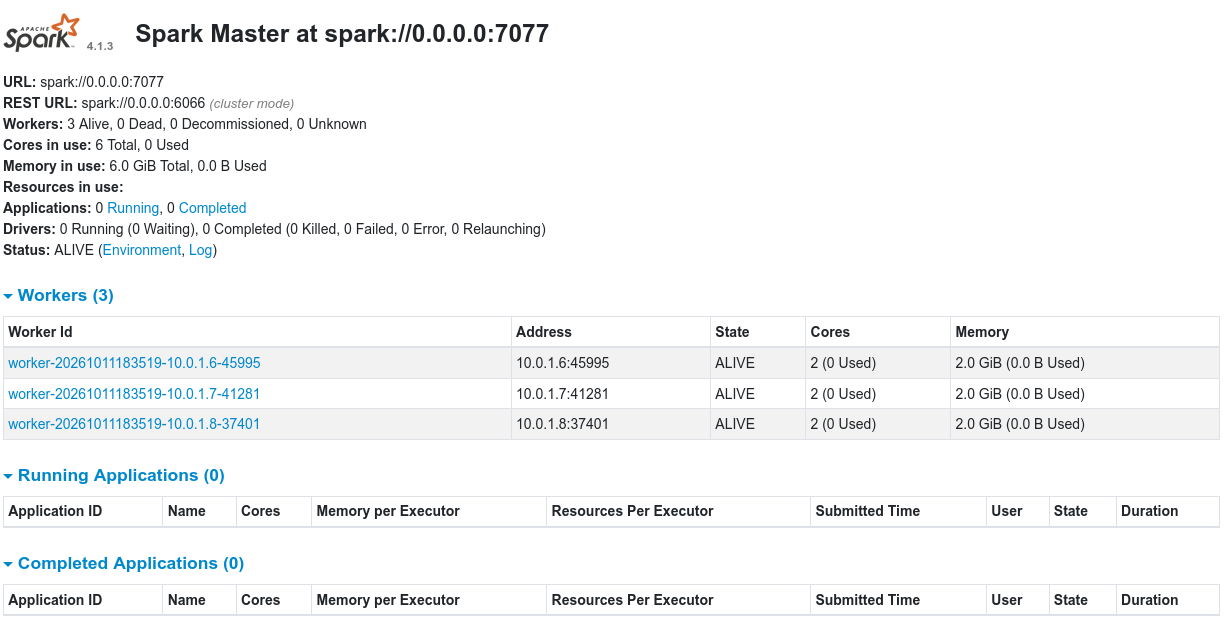
http://localhost:8080/
Python script example
job.py
from pyspark.sql import SparkSession
import random, socket

spark = SparkSession.builder.appName("cluster-test").getOrCreate()
sc = spark.sparkContext

N = 6_000_000
PARTS = 12

def inside(_):
    x, y = random.random(), random.random()
    return 1 if x * x + y * y < 1 else 0

count = sc.parallelize(range(N), PARTS).map(inside).reduce(lambda a, b: a + b)
print(f"\nPi is roughly {4.0 * count / N}\n")

hosts = (sc.parallelize(range(PARTS), PARTS)
           .map(lambda _: socket.gethostname())
           .countByValue())
print("Tasks per executor host:", dict(hosts))

df = spark.range(1_000_000).selectExpr("id", "id % 10 as bucket")
df.groupBy("bucket").count().orderBy("bucket").show()

spark.stop()
Execute python job.pyon master
MASTER=$(docker ps -q -f name=cluster_spark-master)
docker cp job.py $MASTER:/tmp/job.py

docker exec -it $MASTER /opt/spark/bin/spark-submit \
  --master spark://spark-master:7077 \
  --executor-cores 1 \
  --total-executor-cores 3 \
  --executor-memory 1g \
  /tmp/job.py


(...)
+------+------+
|bucket| count|
+------+------+
|     0|100000|
|     1|100000|
|     2|100000|
|     3|100000|
|     4|100000|
|     5|100000|
|     6|100000|
|     7|100000|
|     8|100000|
|     9|100000|
+------+------+

26/10/11 18:45:26 INFO SparkContext: SparkContext is stopping with exitCode 0 from stop at NativeMethodAccessorImpl.java:0.
26/10/11 18:45:26 INFO SparkUI: Stopped Spark web UI at http://0108ea3314a6:4040
26/10/11 18:45:26 INFO StandaloneSchedulerBackend: Shutting down all executors
26/10/11 18:45:26 INFO StandaloneSchedulerBackend$StandaloneDriverEndpoint: Asking each executor to shut down
26/10/11 18:45:26 INFO MapOutputTrackerMasterEndpoint: MapOutputTrackerMasterEndpoint stopped!
26/10/11 18:45:26 INFO MemoryStore: MemoryStore cleared
26/10/11 18:45:26 INFO BlockManager: BlockManager stopped
26/10/11 18:45:26 INFO BlockManagerMaster: BlockManagerMaster stopped
26/10/11 18:45:26 INFO OutputCommitCoordinator$OutputCommitCoordinatorEndpoint: OutputCommitCoordinator stopped!
26/10/11 18:45:26 INFO SparkContext: Successfully stopped SparkContext (Uptime: 9333 ms)
Python remote job example
Calculate pi
pi.py
import os, random, socket
from pyspark.sql import SparkSession

master = os.environ.get("SPARK_MASTER", "spark://localhost:7077")
builder = (SparkSession.builder
           .appName("pi-remote")
           .master(master)
           .config("spark.executor.cores", "1")
           .config("spark.cores.max", "2")
           .config("spark.executor.memory", "500m"))

# Needed so executors can connect back to the driver
if os.environ.get("DRIVER_HOST"):
    builder = (builder
               .config("spark.driver.host", os.environ["DRIVER_HOST"])
               .config("spark.driver.bindAddress", "0.0.0.0")
               .config("spark.driver.port", "7078")
               .config("spark.blockManager.port", "7079"))

spark = builder.getOrCreate()
sc = spark.sparkContext

N, PARTS = 6_000_000, 12

def inside(_):
    x, y = random.random(), random.random()
    return 1 if x * x + y * y < 1 else 0

count = sc.parallelize(range(N), PARTS).map(inside).reduce(lambda a, b: a + b)
print(f"\nPi is roughly {4.0 * count / N}\n")

hosts = (sc.parallelize(range(PARTS), PARTS)
           .map(lambda _: socket.gethostname())
           .countByValue())
print("Tasks per executor host:", dict(hosts))

spark.stop()
# Install pyspark
pip install pyspark
# Get drivers HOST
DRIVER_HOST=$(docker network inspect docker_gwbridge -f '{{(index .IPAM.Config 0).Gateway}}')
SPARK_MASTER=spark://localhost:7077
# Run
python pi.py