Table of Contents
- HDFS Intro
- Executing HDFS commands
- MapReduce Example
- Parallel computing fases
- MapReduce Example
- Getting results
- More examples
- Reducing log output
HDFS Intro
Manager the cluster
$ hadoop
Usage: hadoop [OPTIONS] SUBCOMMAND [SUBCOMMAND OPTIONS]
 or    hadoop [OPTIONS] CLASSNAME [CLASSNAME OPTIONS]
  where CLASSNAME is a user-provided Java class

  OPTIONS is none or any of:

buildpaths                       attempt to add class files from build tree
--config dir                     Hadoop config directory
--debug                          turn on shell script debug mode
--help                           usage information
hostnames list[,of,host,names]   hosts to use in worker mode
hosts filename                   list of hosts to use in worker mode
loglevel level                   set the log4j level for this command
workers                          turn on worker mode

  SUBCOMMAND is one of:


    Admin Commands:

daemonlog     get/set the log level for each daemon

    Client Commands:

archive       create a Hadoop archive
checknative   check native Hadoop and compression libraries availability
classpath     prints the class path needed to get the Hadoop jar and the required libraries
conftest      validate configuration XML files
credential    interact with credential providers
distch        distributed metadata changer
distcp        copy file or directories recursively
dtutil        operations related to delegation tokens
envvars       display computed Hadoop environment variables
fedbalance    balance data between sub-clusters
fs            run a generic filesystem user client
gridmix       submit a mix of synthetic job, modeling a profiled from production load
jar <jar>     run a jar file. NOTE: please use "yarn jar" to launch YARN applications, not this command.
jnipath       prints the java.library.path
kdiag         Diagnose Kerberos Problems
kerbname      show auth_to_local principal conversion
key           manage keys via the KeyProvider
rbfbalance    move directories and files across router-based federation namespaces
rumenfolder   scale a rumen input trace
rumentrace    convert logs into a rumen trace
s3guard       S3 Commands
version       print the version

    Daemon Commands:

kms           run KMS, the Key Management Server
registrydns   run the registry DNS server

SUBCOMMAND may print help when invoked w/o parameters or with -h.
Manage HDFS
$ hdfs
Usage: hdfs [OPTIONS] SUBCOMMAND [SUBCOMMAND OPTIONS]

  OPTIONS is none or any of:

--buildpaths                       attempt to add class files from build tree
--config dir                       Hadoop config directory
--daemon (start|status|stop)       operate on a daemon
--debug                            turn on shell script debug mode
--help                             usage information
--hostnames list[,of,host,names]   hosts to use in worker mode
--hosts filename                   list of hosts to use in worker mode
--loglevel level                   set the log4j level for this command
--workers                          turn on worker mode

  SUBCOMMAND is one of:


    Admin Commands:

cacheadmin           configure the HDFS cache
crypto               configure HDFS encryption zones
debug                run a Debug Admin to execute HDFS debug commands
dfsadmin             run a DFS admin client
dfsrouteradmin       manage Router-based federation
ec                   run a HDFS ErasureCoding CLI
fsck                 run a DFS filesystem checking utility
fsImageValidation    run FsImageValidation to check an fsimage
haadmin              run a DFS HA admin client
jmxget               get JMX exported values from NameNode or DataNode.
oev                  apply the offline edits viewer to an edits file
oiv                  apply the offline fsimage viewer to an fsimage
oiv_legacy           apply the offline fsimage viewer to a legacy fsimage
storagepolicies      list/get/set/satisfyStoragePolicy block storage policies

    Client Commands:

classpath            prints the class path needed to get the hadoop jar and the required libraries
dfs                  run a filesystem command on the file system
envvars              display computed Hadoop environment variables
fetchdt              fetch a delegation token from the NameNode
getconf              get config values from configuration
groups               get the groups which users belong to
lsSnapshot           list all snapshots for a snapshottable directory
lsSnapshottableDir   list all snapshottable dirs owned by the current user
snapshotDiff         diff two snapshots of a directory or diff the current directory contents with a snapshot
version              print the version

    Daemon Commands:

balancer             run a cluster balancing utility
datanode             run a DFS datanode
dfsrouter            run the DFS router
diskbalancer         Distributes data evenly among disks on a given node
httpfs               run HttpFS server, the HDFS HTTP Gateway
journalnode          run the DFS journalnode
mover                run a utility to move block replicas across storage types
namenode             run the DFS namenode
nfs3                 run an NFS version 3 gateway
portmap              run a portmap service
secondarynamenode    run the DFS secondary namenode
sps                  run external storagepolicysatisfier
zkfc                 run the ZK Failover Controller daemon

SUBCOMMAND may print help when invoked w/o parameters or with -h.
Executing HDFS commands
# Verify if HDFS is HEALTHY
$ hdfs fsck /
Connecting to namenode via http://localhost:9870/fsck?ugi=redhat&path=%2F

Status: HEALTHY
 Number of data-nodes:  1
 Number of racks:               1
 Total dirs:                    1
 Total symlinks:                0

Replicated Blocks:
 Total size:    0 B
 Total files:   0
 Total blocks (validated):      0
 Minimally replicated blocks:   0
 Over-replicated blocks:        0
 Under-replicated blocks:       0
 Mis-replicated blocks:         0
 Default replication factor:    1
 Average block replication:     0.0
 Missing blocks:                0
 Corrupt blocks:                0
 Missing replicas:              0
 Blocks queued for replication: 0

Erasure Coded Block Groups:
 Total size:    0 B
 Total files:   0
 Total block groups (validated):        0
 Minimally erasure-coded block groups:  0
 Over-erasure-coded block groups:       0
 Under-erasure-coded block groups:      0
 Unsatisfactory placement block groups: 0
 Average block group size:      0.0
 Missing block groups:          0
 Corrupt block groups:          0
 Missing internal blocks:       0
 Blocks queued for replication: 0
FSCK ended at Mon Jul 20 22:06:04 WEST 2026 in 71 milliseconds

The filesystem under path '/' is HEALTHY

# Create a user directory
hdfs dfs -mkdir -p /user/redhat

# Create a local file
echo "The Quick Brown Fox Jumps Over The Lazy Dog" > sample.txt

# Copy file to hdfs
hadoop fs -put sample.txt

# List files
$ hdfs dfs -ls

Found 1 items
-rw-r--r--   1 redhat supergroup         44 2026-07-20 22:10 sample.txt

# Alternative more generic
$ hadoop fs -ls
Found 1 items
-rw-r--r--   1 redhat supergroup         44 2026-07-20 22:10 sample.txt

# Create a report
$ hdfs dfsadmin -report

Configured Capacity: 8510222336 (7.93 GB)
Present Capacity: 1735151671 (1.62 GB)
DFS Remaining: 1735143424 (1.62 GB)
DFS Used: 8247 (8.05 KB)
DFS Used%: 0.00%
Replicated Blocks:
        Under replicated blocks: 0
        Blocks with corrupt replicas: 0
        Missing blocks: 0
        Missing blocks (with replication factor 1): 0
        Badly Distributed Blocks: 0
        Low redundancy blocks with highest priority to recover: 0
        Pending deletion blocks: 0
Erasure Coded Block Groups:
        Low redundancy block groups: 0
        Block groups with corrupt internal blocks: 0
        Missing block groups: 0
        Badly Distributed Blocks: 0
        Low redundancy blocks with highest priority to recover: 0
        Pending deletion blocks: 0

-------------------------------------------------
Live datanodes (1):

Name: 127.0.0.1:9866 (localhost)
Hostname: hadoop-cfreire-workstation
Decommission Status : Normal
Configured Capacity: 8510222336 (7.93 GB)
DFS Used: 8247 (8.05 KB)
Non DFS Used: 6775070665 (6.31 GB)
DFS Remaining: 1735143424 (1.62 GB)
DFS Used%: 0.00%
DFS Remaining%: 20.39%
Configured Cache Capacity: 0 (0 B)
Cache Used: 0 (0 B)
Cache Remaining: 0 (0 B)
Cache Used%: 100.00%
Cache Remaining%: 0.00%
Xceivers: 0
Last contact: Mon Jul 20 22:12:01 WEST 2026
Last Block Report: Mon Jul 20 22:05:16 WEST 2026
Num of Blocks: 1
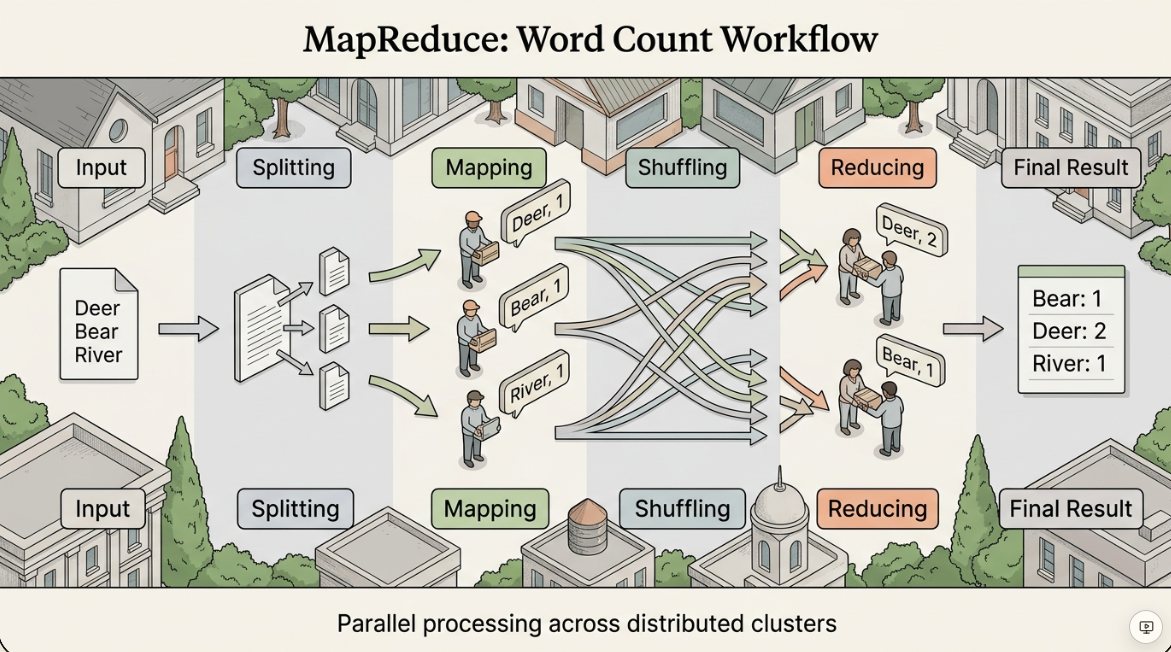
MapReduce Example
-
Map phase: Once divided, datasets are assigned to the task tracker to perform the Map phase. The data functional operation will be performed over the data, emitting the mapped key and value pairs as the output of the Map phase.
-
Reduce phase: The master node then collects the answers to all the sub-problems and combines them in some way to form the output; the answer to the problem it was originally trying to solve.
Parallel computing fases
- Preparing the Map(): input
- Run the user-provided Map() code
- Partition the code
- Shuffle the Map output to the Reduce processors
- Run the user-provided Reduce() code
- Produce the final: output
MapReduce Example
mkdir work
cd work
hdfs dfs -mkdir work
echo "The Quick Brown Fox Jumps Over The Lazy Dog" > ascii.txt
hdfs dfs -put ascii.txt work/

$ hdfs dfs -ls work/
Found 1 items
-rw-r--r--   1 redhat supergroup         44 2026-07-20 22:18 work/ascii.txt

$ hadoop jar $HADOOP_HOME/share/hadoop/mapreduce/hadoop-mapreduce-examples-3.5.0.jar \
  wordcount work/ascii.txt output-$(date +'%Y%m%d-%H%M')
Output Log
    File System Counters
                FILE: Number of bytes read=94
                FILE: Number of bytes written=636817
                FILE: Number of read operations=0
                FILE: Number of large read operations=0
                FILE: Number of write operations=0
                HDFS: Number of bytes read=157
                HDFS: Number of bytes written=56
                HDFS: Number of read operations=8
                HDFS: Number of large read operations=0
                HDFS: Number of write operations=2
                HDFS: Number of bytes read erasure-coded=0
        Job Counters
                Launched map tasks=1
                Launched reduce tasks=1
                Data-local map tasks=1
                Total time spent by all maps in occupied slots (ms)=6028
                Total time spent by all reduces in occupied slots (ms)=5955
                Total time spent by all map tasks (ms)=6028
                Total time spent by all reduce tasks (ms)=5955
                Total vcore-milliseconds taken by all map tasks=6028
                Total vcore-milliseconds taken by all reduce tasks=5955
                Total megabyte-milliseconds taken by all map tasks=6172672
                Total megabyte-milliseconds taken by all reduce tasks=6097920
        Map-Reduce Framework
                Map input records=1
                Map output records=9
                Map output bytes=80
                Map output materialized bytes=94
                Input split bytes=113
                Combine input records=9
                Combine output records=8
                Reduce input groups=8
                Reduce shuffle bytes=94
                Reduce input records=8
                Reduce output records=8
                Spilled Records=16
                Shuffled Maps =1
                Failed Shuffles=0
                Merged Map outputs=1
                GC time elapsed (ms)=82
                CPU time spent (ms)=1950
                Physical memory (bytes) snapshot=450990080
                Virtual memory (bytes) snapshot=6373462016
                Total committed heap usage (bytes)=241172480
                Peak Map Physical memory (bytes)=263790592
                Peak Map Virtual memory (bytes)=3184037888
                Peak Reduce Physical memory (bytes)=187199488
                Peak Reduce Virtual memory (bytes)=3189424128
        Shuffle Errors
                BAD_ID=0
                CONNECTION=0
                IO_ERROR=0
                WRONG_LENGTH=0
                WRONG_MAP=0
                WRONG_REDUCE=0
        File Input Format Counters
                Bytes Read=44
        File Output Format Counters
                Bytes Written=56
Getting results
$ hdfs dfs -ls
Found 3 items
drwxr-xr-x   - redhat supergroup          0 2026-07-20 22:20 output-20260720-2220
-rw-r--r--   1 redhat supergroup         44 2026-07-20 22:10 sample.txt
drwxr-xr-x   - redhat supergroup          0 2026-07-20 22:18 work

$ hdfs dfs -ls output-20260720-2220
Found 2 items
-rw-r--r--   1 redhat supergroup          0 2026-07-20 22:20 output-20260720-2220/_SUCCESS
-rw-r--r--   1 redhat supergroup         56 2026-07-20 22:20 output-20260720-2220/part-r-00000

$ hdfs dfs -cat output-20260720-2220/part-r-00000
Brown   1
Dog     1
Fox     1
Jumps   1
Lazy    1
Over    1
Quick   1
The     2
More examples
$ hadoop jar $HADOOP_HOME/share/hadoop/mapreduce/hadoop-mapreduce-examples-3.5.0.jar

Valid program names are:
  aggregatewordcount: An Aggregate based map/reduce program that counts the words in the input files.
  aggregatewordhist: An Aggregate based map/reduce program that computes the histogram of the words in the input files.
  bbp: A map/reduce program that uses Bailey-Borwein-Plouffe to compute exact digits of Pi.
  dbcount: An example job that count the pageview counts from a database.
  distbbp: A map/reduce program that uses a BBP-type formula to compute exact bits of Pi.
  grep: A map/reduce program that counts the matches of a regex in the input.
  join: A job that effects a join over sorted, equally partitioned datasets
  multifilewc: A job that counts words from several files.
  pentomino: A map/reduce tile laying program to find solutions to pentomino problems.
  pi: A map/reduce program that estimates Pi using a quasi-Monte Carlo method.
  randomtextwriter: A map/reduce program that writes 10GB of random textual data per node.
  randomwriter: A map/reduce program that writes 10GB of random data per node.
  secondarysort: An example defining a secondary sort to the reduce.
  sort: A map/reduce program that sorts the data written by the random writer.
  sudoku: A sudoku solver.
  teragen: Generate data for the terasort
  terasort: Run the terasort
  teravalidate: Checking results of terasort
  wordcount: A map/reduce program that counts the words in the input files.
  wordmean: A map/reduce program that counts the average length of the words in the input files.
  wordmedian: A map/reduce program that counts the median length of the words in the input files.
  wordstandarddeviation: A map/reduce program that counts the standard deviation of the length of the words in the input files.

## Calculate pi
hadoop jar $HADOOP_HOME/share/hadoop/mapreduce/hadoop-mapreduce-examples-3.5.0.jar pi 4 10000
Reducing log output
$ vi /usr/local/hadoop-3.5.0/etc/hadoop/log4j.properties
Change line to WARN
# Logging Threshold
log4j.threshold=WARN