Table of Contents
- Installing Git
- Create a GitHub account
- Create SSH-KEYS
- Git Basics (console)
- Exercise #1 :: VSCODE Git workout
- Ignoring Files
- Git commands
Installing Git

Verify git installed. Open bash, powershell , zsh , …
$ git --version
git version 2.43.0
Create a GitHub account
Create SSH-KEYS
Create ssh-key
ssh-keygenExtract public-key
$ ssh-keygen -y
Enter file in which the key is (/home/cfreire/.ssh/id_rsa):
ssh-rsa AAAAB3NzaC1yc2EAAAADAQABAAABgQCyxv8k2JWca1TNEzAhA/XVxObruIe7fHjnpNfsJAVIa74i+6+2ZXhi+1sgG9Jy4YCuowAEpq+BqipiU+X4KleIeZn1umx4DiDNBxj2Ydw0PHLm/LXILq2DpcrRXMmARCHIa3Zk39jggKE8GHeqflqzqhminqZNdDxLMtfY3hNh/Xi4TXm+BsRFJ/WWKgk0nnQ2Wy7LXVcpv9iOEdYHeINnGiRDLrIZvnRSx1CvZZxj9B6Fh9EmqsyJaG/nth8u0qxWDL+W8W5Jolb2Y1QTVHaWwWcSmkpCsaep6sunw0BA8TpXBBFP8ePP+UCHc+YltIcPq8wDSKfzsDFSPO7qqBNPmztDMYyeEHaVS8GF+idkHv1wlrav9BkoNIQI+qhokckeSp4pZSpAieVeNse5ELEa+VXpMTIP5RS0JbkY8c3+g8+hrDYPGM87LuLkmq5DD09JnyHWJ0BbS7v5AoMbTd4OS4beBG6TFFBC3YuIeqVlXH6XmYQiGTKc8UTRLXvVkI0= cfreire@x1
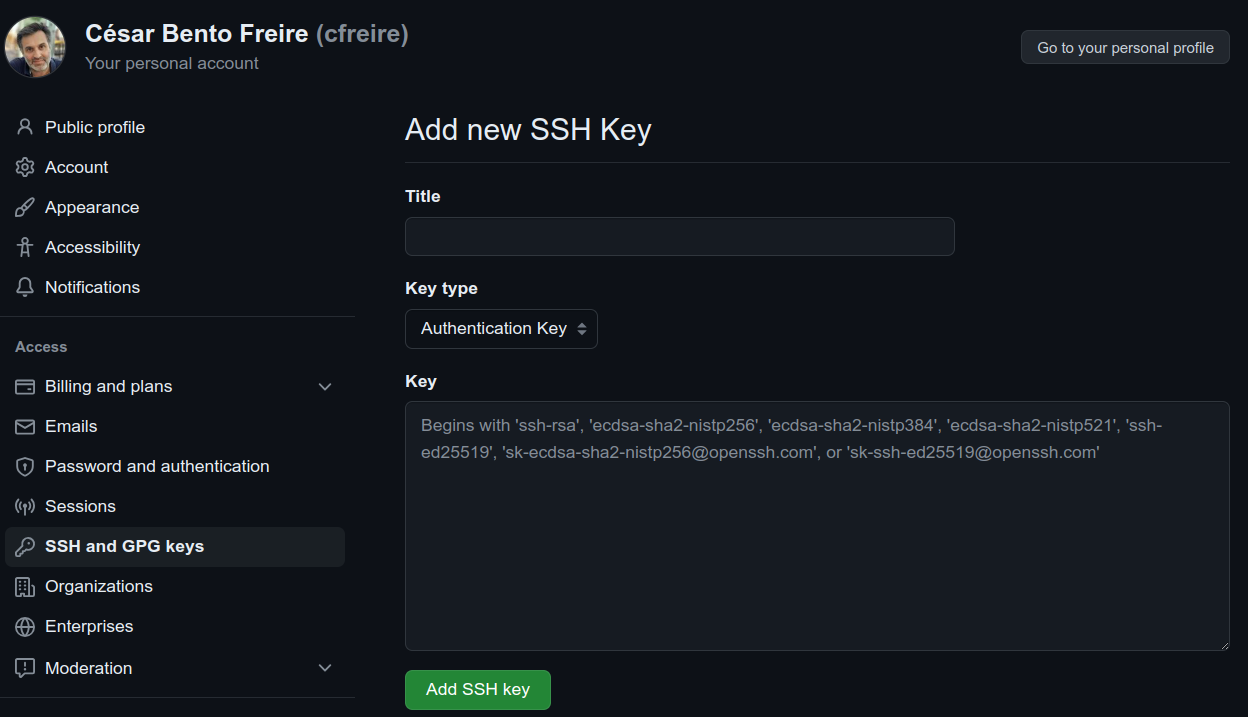
Add ssk-key to github
Profile » Settings » SSH and GPG Keys
First-Time Git Setup
Git comes with a tool called git config that lets you get and set configuration variables that control all aspects of how Git looks and operates
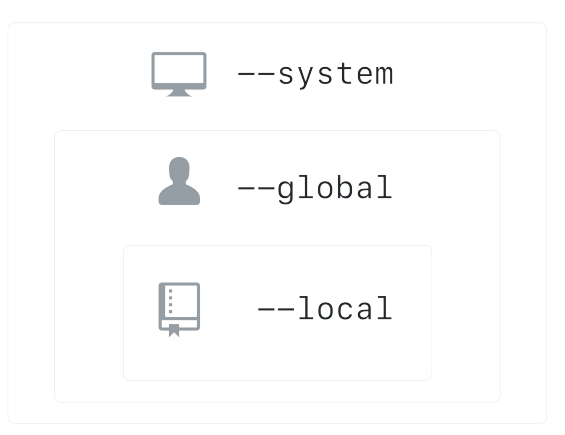
--system
These are system-wide configurations. They apply to all users on this computer.
--global
These are the user level configurations. They only apply to your user account.
--local
These are the repository level configurations. They only apply to the specific repository where they are set
git config --global user.name "[name]"
git config --global user.email "[email address]"
git config --global color.ui auto
git config --global init.defaultbranch main
git config --list
Git Basics (console)
# Create directory
mkdir first-steps
cd first-steps

# initialize git repository
git init
Introduction to markdown
https://www.markdownguide.org/
Add README.md
# My First Git Project

* author: __César Freire__
* date: __2024-04-22__
Add LICENCE
Example MIT Licence
MIT License

Copyright (c) [year] [fullname]

Permission is hereby granted, free of charge, to any person obtaining a copy
of this software and associated documentation files (the "Software"), to deal
in the Software without restriction, including without limitation the rights
to use, copy, modify, merge, publish, distribute, sublicense, and/or sell
copies of the Software, and to permit persons to whom the Software is
furnished to do so, subject to the following conditions:

The above copyright notice and this permission notice shall be included in all
copies or substantial portions of the Software.

THE SOFTWARE IS PROVIDED "AS IS", WITHOUT WARRANTY OF ANY KIND, EXPRESS OR
IMPLIED, INCLUDING BUT NOT LIMITED TO THE WARRANTIES OF MERCHANTABILITY,
FITNESS FOR A PARTICULAR PURPOSE AND NONINFRINGEMENT. IN NO EVENT SHALL THE
AUTHORS OR COPYRIGHT HOLDERS BE LIABLE FOR ANY CLAIM, DAMAGES OR OTHER
LIABILITY, WHETHER IN AN ACTION OF CONTRACT, TORT OR OTHERWISE, ARISING FROM,
OUT OF OR IN CONNECTION WITH THE SOFTWARE OR THE USE OR OTHER DEALINGS IN THE
SOFTWARE.
Recording Changes to the Repository
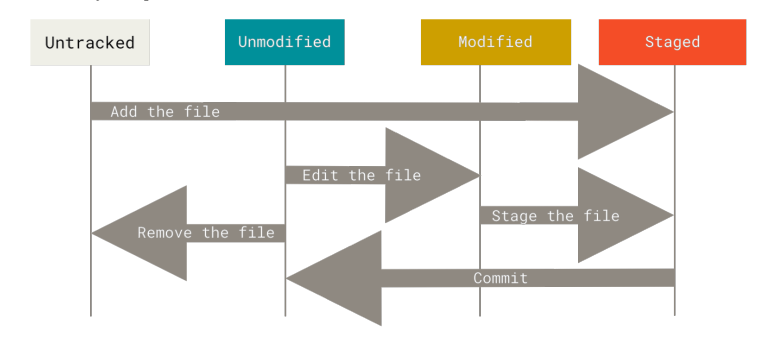
$ git status

On branch main

No commits yet

Untracked files:
  (use "git add <file>..." to include in what will be committed)
        LICENCE
        README.md

nothing added to commit but untracked files present (use "git add" to track)

$ git add *
$ git status
On branch main

No commits yet

Changes to be committed:
  (use "git rm --cached <file>..." to unstage)
        new file:   LICENCE
        new file:   README.md

$ git commit -m "Add Licence and README"
[main (root-commit) 44f9ef7] Add Licence and README
 2 files changed, 26 insertions(+)
 create mode 100644 LICENCE
 create mode 100644 README.md

$ git status
On branch main
nothing to commit, working tree clean

$ git log
commit 44f9ef755980f4db08346eafa7af6d57d6824f42 (HEAD -> main)
Author: César Bento Freire <cfreire70@gmail.com>
Date:   Sun Apr 21 21:37:37 2024 +0100

    Add Licence and README
Good commit messages should:
- Be short. ~50 characters is ideal.
- Describe the change introduced by the commit.
- Tell the story of how your project has evolved.
Add CONTRIBUTING.md
# Want to participate

César Freire <ccesar.freire@training.rumos.pt>
View in short status
$ git status -s
?? CONTRIBUTING.md

$ git add CONTRIBUTING.md
$ git status
On branch main
Changes to be committed:
  (use "git restore --staged <file>..." to unstage)
        new file:   CONTRIBUTING.md

$ git commit -m "Add contribute"
[main 2473690] Add contribute
 1 file changed, 3 insertions(+)
 create mode 100644 CONTRIBUTING.md

$ git log
commit 2473690dcccc524a4372162dd7fe9f9ede1a0fed (HEAD -> main)
Author: César Bento Freire <cfreire70@gmail.com>
Date:   Sun Apr 21 21:53:24 2024 +0100

    Add contribute

commit 44f9ef755980f4db08346eafa7af6d57d6824f42
Author: César Bento Freire <cfreire70@gmail.com>
Date:   Sun Apr 21 21:37:37 2024 +0100

    Add Licence and README
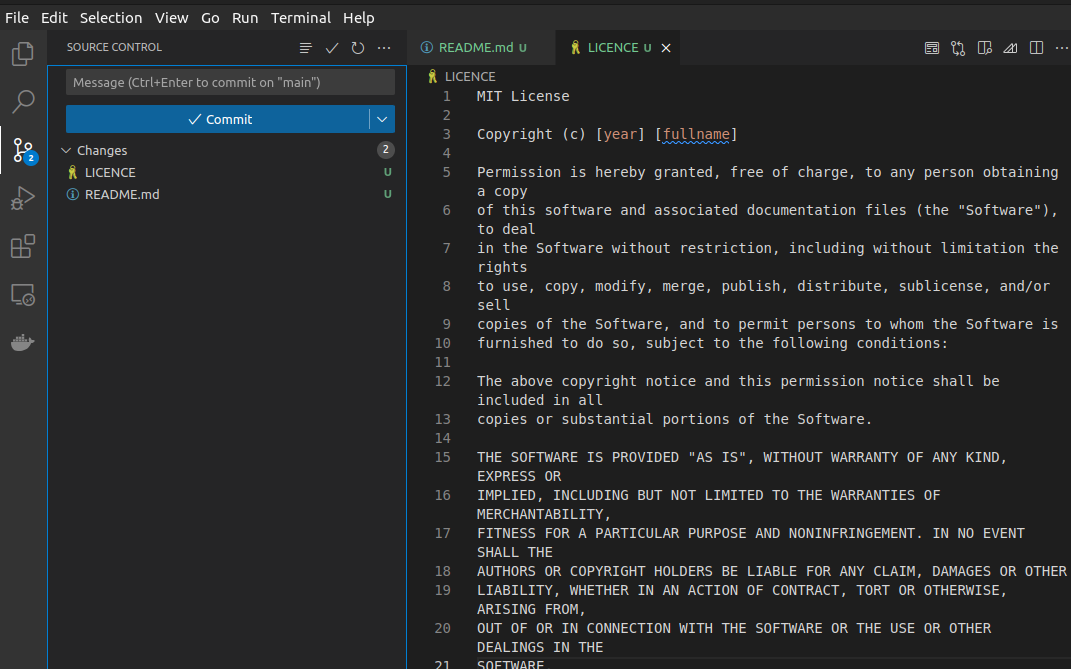
Exercise #1 :: VSCODE Git workout
- Create a VSCODE “new window”
- Create a new folder
02-vscode-stepsand open - Initialize git repository
- Copy README.md and LICENCE
- Commit
Ignoring Files
.gitignore
https://www.toptal.com/developers/gitignore
Examples
# ignore all .a files
*.a

# but do track lib.a, even though you're ignoring .a files above
!lib.a

# only ignore the TODO file in the current directory, not subdir/TODO
/TODO

# ignore all files in any directory named build
build/

# ignore doc/notes.txt, but not doc/server/arch.txt
doc/*.txt

# ignore all .pdf files in the doc/ directory and any of its subdirectories
doc/**/*.pdf
Github ignore archive
https://github.com/github/gitignore
.gitignore
# ignore text files
*.txt
Add text file and verifiy is not tracked
CHANGELOG.txt
This file is ignored by git
Git commands
usage: git [-v | --version] [-h | --help] [-C <path>] [-c <name>=<value>]
           [--exec-path[=<path>]] [--html-path] [--man-path] [--info-path]
           [-p | --paginate | -P | --no-pager] [--no-replace-objects] [--no-lazy-fetch]
           [--no-optional-locks] [--no-advice] [--bare] [--git-dir=<path>]
           [--work-tree=<path>] [--namespace=<name>] [--config-env=<name>=<envvar>]
           <command> [<args>]

These are common Git commands used in various situations:

start a working area (see also: git help tutorial)
   clone      Clone a repository into a new directory
   init       Create an empty Git repository or reinitialize an existing one

work on the current change (see also: git help everyday)
   add        Add file contents to the index
   mv         Move or rename a file, a directory, or a symlink
   restore    Restore working tree files
   rm         Remove files from the working tree and from the index

examine the history and state (see also: git help revisions)
   bisect     Use binary search to find the commit that introduced a bug
   diff       Show changes between commits, commit and working tree, etc
   grep       Print lines matching a pattern
   log        Show commit logs
   show       Show various types of objects
   status     Show the working tree status

grow, mark and tweak your common history
   backfill   Download missing objects in a partial clone
   branch     List, create, or delete branches
   commit     Record changes to the repository
   merge      Join two or more development histories together
   rebase     Reapply commits on top of another base tip
   reset      Reset current HEAD to the specified state
   switch     Switch branches
   tag        Create, list, delete or verify a tag object signed with GPG

collaborate (see also: git help workflows)
   fetch      Download objects and refs from another repository
   pull       Fetch from and integrate with another repository or a local branch
   push       Update remote refs along with associated objects

'git help -a' and 'git help -g' list available subcommands and some
concept guides. See 'git help <command>' or 'git help <concept>'
to read about a specific subcommand or concept.
See 'git help git' for an overview of the system.