Table of Contents
- Docker swarm architecture
- The Raft Consensus Algorithm
- Lab environment
- Create a Swarm
- Configure a remote Docker context
- Create a stack
- Scale Apps
- Task Command
- Exercise: Redis Replication
Docker swarm architecture
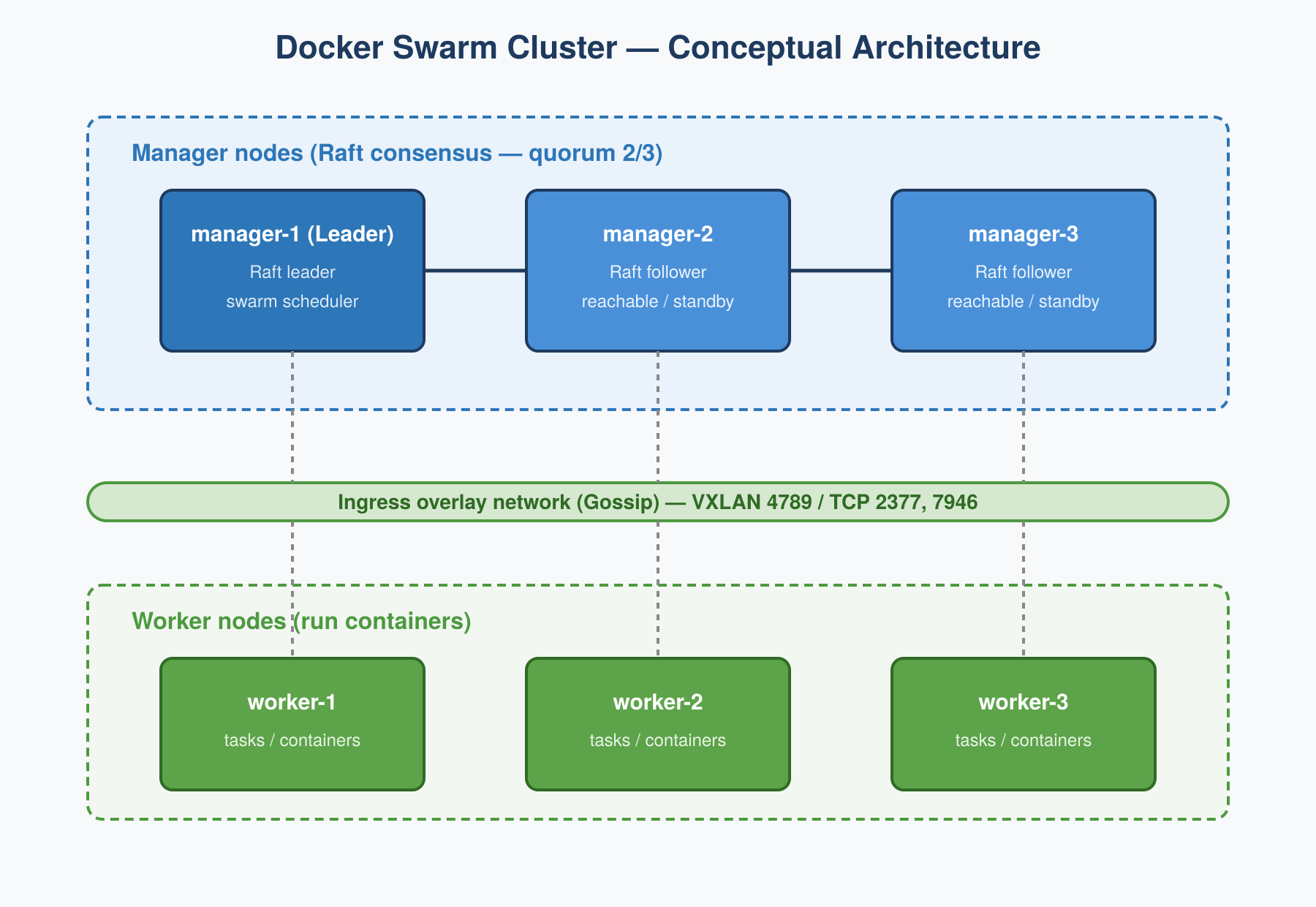
Conceptual Swarm cluster: 3 manager nodes (Raft quorum) and 3 worker nodes connected via the ingress overlay network.
The Raft Consensus Algorithm
Raft is the consensus algorithm Docker SwarmKit uses to keep the cluster state consistent across manager nodes. It solves the fundamental problem of distributed systems: how can multiple nodes agree on a single value (the cluster state) when some of them may fail?
Core concepts
- State machine replication: every manager holds a full copy of the Raft log — the append-only record of every change to the swarm state (services, tasks, nodes, secrets). If all managers apply the same log entries in the same order, they converge to the same state.
- Leader-based consensus: exactly one manager is the leader at any time; it is the only node that accepts changes and replicates log entries to the followers. The other managers are followers.
- Terms: time is divided into monotonically increasing terms. Each term starts with an election; every log entry carries the term in which it was created. A node only accepts entries from a leader with a term at least as high as its own — this prevents stale leaders from causing split-brain.
How it works
- Leader election: if a follower receives no heartbeat (
AppendEntriesRPC) from the leader within an election timeout (randomized, typically ~1s), it transitions to candidate, increments the term, and requests votes from all peers. A candidate that receives a majority (quorum) of votes becomes leader. - Log replication: all writes (e.g.
docker service create) must go through the leader. The leader appends the entry to its log, replicates it to followers, and only commits the entry once a majority has acknowledged it — only then is the change applied and reported back to the client. - Safety: a candidate can only win an election if its log is at least as up-to-date as a majority of the cluster, so a committed entry can never be lost or overwritten by a new leader.
- Failure handling: if the leader dies, followers time out and a new election begins. If a follower is partitioned, the leader keeps operating as long as it retains quorum.
Why an odd number of managers (quorum)
Raft requires a majority (quorum) to elect a leader and commit writes:
| Managers | Quorum | Tolerated failures |
|---|---|---|
| 1 | 1 | 0 |
| 3 | 2 | 1 |
| 5 | 3 | 2 |
| 7 | 4 | 3 |
An even number (e.g. 4) adds no failure tolerance over 3 but requires a larger quorum — hence the recommendation of 3, 5, or 7 managers.
Raft in Docker Swarm
- Cluster state and the cryptographic secrets (join tokens, certificates) are stored in the Raft log, replicated on every manager.
- If quorum is lost, the swarm stops scheduling new tasks (existing containers keep running) and commands like
docker service lsfail until quorum is restored. - Losing a majority of managers without backup means the cluster state is unrecoverable — hence the
--force-new-clusterrecovery procedure or regular manager backups.
Note:
Try the visualization at https://raft.github.io/ to watch elections, log replication, and commit points in real time.
Lab environment
Lab instances               (public ip)      (private ip)
=========================================================
swarm-cfreire-node1        35.159.197.115  172.31.1.89
swarm-cfreire-node2        35.159.12.205   172.31.7.128
swarm-cfreire-node3        3.74.215.51     172.31.14.197
swarm-cfreire-node4        18.193.80.66    172.31.1.169
swarm-cfreire-node5        63.179.193.223  172.31.9.239
swarm-cfreire-workstation  18.192.106.94   172.31.0.15
=========================================================
Create a Swarm
Connect to node1 and start a cluster
docker swarm initExpected output:
Swarm initialized: current node (l1gm6m32znt0snn5cr326xaxo) is now a manager.

To add a worker to this swarm, run the following command:

    docker swarm join --token SWMTKN-1-61esv6lmn2gmmhz7n235ograo6o8e8us5zhidu0784db9im4gt-3t4q5m1532w0xtm85333129o1 [IP_ADDRESS]:2377

To add a manager to this swarm, run 'docker swarm join-token manager' and follow the instructions.
Add worker nodes
On each additional node, run the join command printed by swarm init:
docker swarm join --token SWMTKN-1-61esv6lmn2gmmhz7n235ograo6o8e8us5zhidu0784db9im4gt-3t4q5m1532w0xtm85333129o1 [IP_ADDRESS]:2377Verify the cluster state:
$ docker node ls
ID                            HOSTNAME   STATUS    AVAILABILITY   MANAGER STATUS   ENGINE VERSION
l1gm6m32znt0snn5cr326xaxo *   node1      Ready     Active         Leader           20.10.0
ox5turgblm2vcbv4z52mj24n3     node2      Ready     Active                          20.10.0
3m6srsadund2x8507jyj5yow6     node3      Ready     Active                          20.10.0
ou7zkauznar6fjmfgz8c5bhci     node4      Ready     Active                          20.10.0
Add another manager
Print the join token for manager nodes:
docker swarm join-token managerExpected output:
To add a manager to this swarm, run the following command:

    docker swarm join --token SWMTKN-1-61esv6lmn2gmmhz7n235ograo6o8e8us5zhidu0784db9im4gt-9o8bmrz76lycf9b5c4k1aua8a [IP_ADDRESS]:2377
After joining node5 with the manager token, the cluster shows five nodes — one Leader, one Reachable (extra manager), three workers:
$ docker node ls
ID                            HOSTNAME   STATUS    AVAILABILITY   MANAGER STATUS   ENGINE VERSION
l1gm6m32znt0snn5cr326xaxo *   node1      Ready     Active         Leader           20.10.0
ox5turgblm2vcbv4z52mj24n3     node2      Ready     Active                          20.10.0
3m6srsadund2x8507jyj5yow6     node3      Ready     Active                          20.10.0
ou7zkauznar6fjmfgz8c5bhci     node4      Ready     Active                          20.10.0
lh9acw59pqpp7d6x0wheacq1z     node5      Ready     Active         Reachable        20.10.0
Manager quorum
Swarm managers run a Raft consensus algorithm. Always keep an odd number of managers (3, 5, 7) so a majority (quorum) survives failures. Losing the majority makes the cluster read-only — services keep running but can’t be scheduled or updated.
Configure a remote Docker context
docker context create swarm-cluster \
  --docker "host=ssh://swarm-cfreire-node1"

# activate context
docker context use swarm-cluster

# list nodes from workstation
docker node ls

ID                            HOSTNAME              STATUS    AVAILABILITY   MANAGER STATUS   ENGINE VERSION
dr29306o3bkihti1oilfwoci8 *   swarm-cfreire-node1   Ready     Active         Leader           25.0.18
7i2a0m65sg4bl12qni5x2qkzx     swarm-cfreire-node2   Ready     Active         Reachable        25.0.18
o1i3tmzh3uhwsfvxz7febmeu7     swarm-cfreire-node3   Ready     Active         Reachable        25.0.18
txw2hv5i6rzbdbwkkbxxcqiko     swarm-cfreire-node4   Ready     Active         Reachable        25.0.18
zrslugkintioq4dhofa2dyurk     swarm-cfreire-node5   Ready     Active         Reachable        25.0.18
Create a stack
Write a docker-compose.yml
vi docker-compose.yml---
services:
redis:
image: "redis:alpine"
webcounter:
image: "cfreire70/webcounter"
ports:
- 8080:5000
environment:
- REDIS_URL=redis
depends_on:
- redis
deploy:
mode: replicated
replicas: 3
resources:
limits:
cpus: "0.2"
memory: 128M
restart_policy:
condition: on-failureDeploy the stack
docker stack deploy --compose-file docker-compose.yml appInspect the stack and its services:
$ docker stack ls

$ docker stack services app
ID             NAME             MODE         REPLICAS   IMAGE                         PORTS
mysnsg8tzwqo   app_redis        replicated   1/1        redis:alpine                  *:6379->6379/tcp
vtl1ge1f5gfv   app_webcounter   replicated   3/3        cfreire70/webcounter:latest   *:8080->5000/tcp
Locate where the service tasks are scheduled:
$ docker stack ps app
ID             NAME               IMAGE                         NODE      DESIRED STATE   CURRENT STATE           ERROR     PORTS
wyub0kejt31a   app_redis.1        redis:alpine                  node1     Running         Running 8 minutes ago
jfdn4yfh00jr   app_webcounter.1   cfreire70/webcounter:latest   node2     Running         Running 8 minutes ago
qkzlbwurld96   app_webcounter.2   cfreire70/webcounter:latest   node3     Running         Running 8 minutes ago
ut7ymo4r1ifx   app_webcounter.3   cfreire70/webcounter:latest   node4     Running         Running 8 minutes ago
Node failure drill
Delete a worker node and watch Swarm reschedule its tasks on remaining nodes:
Destructive commands
docker node rmremoves the node from the swarm and reschedules its workloads. In this lab that is the point of the exercise — never do this on a production cluster.
watch docker stack ps app

# on another session / terminal
docker node rm node2
Expected output — app_webcounter.1 shows \_ app_webcounter.1 (shutdown history) and a replacement task starts on node5:
ID             NAME                   IMAGE                         NODE      DESIRED STATE   CURRENT STATE      ERROR     PORTS
wyub0kejt31a   app_redis.1            redis:alpine                  node1     Running         Running 11 minutes ago
sztbl12vafcl   app_webcounter.1       cfreire70/webcounter:latest   node5     Running         Running 14 seconds ago
jfdn4yfh00jr    \_ app_webcounter.1   cfreire70/webcounter:latest   node2     Shutdown        Running 11 minutes ago
qkzlbwurld96   app_webcounter.2       cfreire70/webcounter:latest   node3     Running         Running 11 minutes ago
ut7ymo4r1ifx   app_webcounter.3       cfreire70/webcounter:latest   node4     Running         Running 11 minutes ago
Promote another node to manager:
docker node promote node4Manager failure drill
Destroy the Leader node and watch the cluster react:
watch docker node lsExpected output — the Leader becomes Unreachable:
Every 2.0s: docker node ls                                                  2022-06-28 22:41:17

ID                            HOSTNAME   STATUS    AVAILABILITY   MANAGER STATUS   ENGINE VERSION
rl2mu69gmu5pw6mph1fzb9ey8     node1      Unknown   Active         Unreachable      20.10.0
kzjgas8nq3mwyws9ynyhrsjfp     node2      Ready     Active                          20.10.0
m7qgmywq52vzsjnpzemublqd3     node3      Ready     Active                          20.10.0
6wlg4nx3lww92gey42q6egeep     node4      Ready     Active         Leader           20.10.0
Demote the down node and remove it from the swarm:
docker node demote node1
docker node rm node1
Scale Apps
List running services:
$ docker service ls
ID             NAME             MODE         REPLICAS   IMAGE                         PORTS
47dmjc01giqq   app_redis        replicated   1/1        redis:alpine                  *:6379->6379/tcp
hfnz470d84fu   app_webcounter   replicated   3/3        cfreire70/webcounter:latest   *:80->5000/tcp
Scale app_webcounter to 5 replicas:
docker service scale app_webcounter=5Verify the new tasks:
$ docker service ps app_webcounter
ID             NAME                   IMAGE                         NODE                        DESIRED STATE   CURRENT STATE            ERROR     PORTS
lobxhq7xj5hi   app_webcounter.1       cfreire70/webcounter:latest   node2                       Running         Running 10 minutes ago
0vnw40329sch   app_webcounter.2       cfreire70/webcounter:latest   node3                       Running         Running 10 minutes ago
lzwmu3h9ai1b   app_webcounter.3       cfreire70/webcounter:latest   node4                       Running         Running 9 minutes ago
apq8th0sd788    \_ app_webcounter.3   cfreire70/webcounter:latest   rl2mu69gmu5pw6mph1fzb9ey8   Shutdown        Orphaned 7 minutes ago
xjbkxs10ixrt   app_webcounter.4       cfreire70/webcounter:latest   node4                       Running         Running 40 seconds ago
k5r2160wo7cp   app_webcounter.5       cfreire70/webcounter:latest   node5                       Running         Running 35 seconds ago
Rollback the service to its previous state:
docker service rollback app_webcounterRebalance
Force a rebalance of replicas across nodes (Swarm does this automatically over time; --force triggers it immediately):
docker service update --force app_webcounterSimulate a bug in the app
Kill the Redis task and verify that Swarm starts a replacement container automatically:
docker kill app_redis.1.<TASK-ID>Confirm with docker service ps app_redis that a new task is Running.
Shutdown the stack
docker stack rm appTask Command
- List nodes
docker node ls - List services
docker service ls - List running tasks
docker service ps my-service - Inspect a service
docker service inspect my-service - View service logs
docker service logs my-service - Scale a service
docker service scale my-service=3 - Deploy a stack
docker stack deploy -c compose.yml mystack - List stacks
docker stack ls - List stack services
docker stack services mystack - Drain a node
docker node update --availability drain worker1
Exercise: Redis Replication
Objectives — start from scratch and build:
- A 5-node Swarm
- 3 Managers
- 2 Workers
- A stack with a Redis master, two replicas and Redis Commander
Replication concepts
Master–Replica replication: replicaof makes a Redis instance a copy of another Redis server.
+------------------+      +---------------+
|      Master      | ---> |    Replica    |
| (receive writes) |      |  (exact copy) |
+------------------+      +---------------+
Key properties of Redis replication:
- Replication is asynchronous, but a master can be configured to stop accepting writes if it appears disconnected from at least a given number of replicas.
- Replicas can perform a partial resynchronization with the master after a short link loss, using a configurable replication backlog.
- Replication is automatic: after a network partition, replicas reconnect and resynchronize with the master without user intervention.
Stack file: master + replicas
Save as docker-compose.yml:
---
version: '3'
services:
  master:
    container_name: master
    image: redis
    ports:
      - 6379:6379
  slave-a:
    container_name: slave-a
    image: redis
    ports:
      - 7000:6379
    volumes:
      - ./conf:/usr/local/etc/redis/
    command: redis-server /usr/local/etc/redis/redis.conf
  slave-b:
    container_name: slave-b
    image: redis
    ports:
      - 7001:6379
    volumes:
      - ./conf:/usr/local/etc/redis/
    command: redis-server /usr/local/etc/redis/redis.conf
  redis-commander:
    container_name: redis-commander
    hostname: redis-commander
    image: rediscommander/redis-commander:latest
    restart: always
    environment:
      - REDIS_HOSTS=master:master,slave-a:slave-a,slave-b:slave-b
    ports:
      - "8081:8081"
The redis.conf referenced above must contain replicaof master 6379 for each replica.
Deploy with docker stack deploy --compose-file docker-compose.yml redis-repl.
Stack file: Sentinel variant
Alternative approach using Bitnami images with automatic failover:
version: '2'

networks:
  app-tier:
    driver: bridge

services:

  redis:
    image: 'bitnami/redis:latest'
    environment:
      - ALLOW_EMPTY_PASSWORD=yes
    networks:
      - app-tier

  redis-sentinel:
    image: 'bitnami/redis-sentinel:latest'
    environment:
      - REDIS_MASTER_HOST=redis
    ports:
      - '26379:26379'
    networks:
      - app-tier
Lab-only configuration
ALLOW_EMPTY_PASSWORD=yesis acceptable only in a training environment. Any real deployment must set a strong Redis password (REDIS_PASSWORD).
Inspect the replication and failover via the Redis Commander UI at http://localhost:8081.